Post Effects
Post effects turn the final particle or simulation state into viewport points, trails, instances, meshes, upres detail or Dendrite geometry.
Where to find it
- Lists: 3D Viewport > Sidebar > Pro Particles > Post Effects.
- Nodes: Pro Physics editor > Shift+A > Post Effects and connect the complete final particle stream.
Post effects and their output
| Post effect | Result |
|---|---|
| Point Cloud | final point representation / GPU preview |
| Trails | trajectory, connection or constraint-link geometry |
| Instance | object or collection instances on particles |
| Mesher | reconstructed particle surface |
| Upres | additional non-physical detail particles for downstream presentation |
| Dendrite | geometry generated from Dendrite branch history |
Node-specific stream and output rules are summarized in Post Effect and Output Nodes.
Post Effects operate after simulation and provide the final particle presentation or a downstream geometry source. The current stack contains Point Cloud, Trails, Instance, Mesher, Upres, and Dendrite.
Point Cloud, Particle Trails, Instance, Mesher and Dendrite support GPU Preview for interactive work and Blender Geometry when Blender objects are required. Switching to Blender Geometry can show the current frame without repeating the simulation.
Lists and Nodes workflow
Lists
- Finish the simulation effects before tuning presentation. Post effects always consume the completed particle state, not an intermediate point in the Effects list.
- Open Post Effects, add the result type that matches the required output, then use its Group and Emitter filters when only part of the simulation should be shown.
- Use
GPU Previewwhile tuning when available. Switch toBlender Geometrywhen Blender objects, Geometry Nodes, modifiers, materials or persistent Output Cache geometry are required. - Configure the dedicated Output tab only after the post effect is stable. A post effect controls presentation; an Output Cache or Alembic output controls persistent storage or export.
Nodes
Connect the complete, final particle stream to a post-effect node. A post effect cannot consume an unmerged Emitter Branch, and the graph reports an error if any simulation effect lies outside its upstream history. Branch the completed stream into several post nodes when the same simulation needs, for example, both a Mesher and a Point Cloud.
Point Cloud, Trails, Instance, Mesher and Dendrite provide geometry through their Result output. Connect that result to Output Cache, Alembic, or the multi-input Geometry socket on Simulation Output as needed. Upres outputs a new particle stream through Result. In Nodes, connect it to a later Point Cloud, Instance, Trails or Mesher to display or export those detail particles.
Post-effect filters still operate inside the connected complete stream. Use them instead of Emitter Branch to select visible groups or emitters at this stage.
Choose the result
| Need | Post effect | Important consequence |
|---|---|---|
| direct particles or debug attributes | Point Cloud | cheapest direct representation; Blender Geometry can carry selected particle attributes |
| paths or connections | Trails | history and connection topology can become the dominant cost |
| repeated objects | Instance | source geometry, realization and orientation determine output cost |
| one reconstructed surface | Mesher | adds a separate voxel reconstruction resolution |
| more render-only particles | Upres | does not change the physical simulation |
| canonical Dendrite branches | Dendrite | requires a Dendrite simulation effect as its source |
Compare the outputs
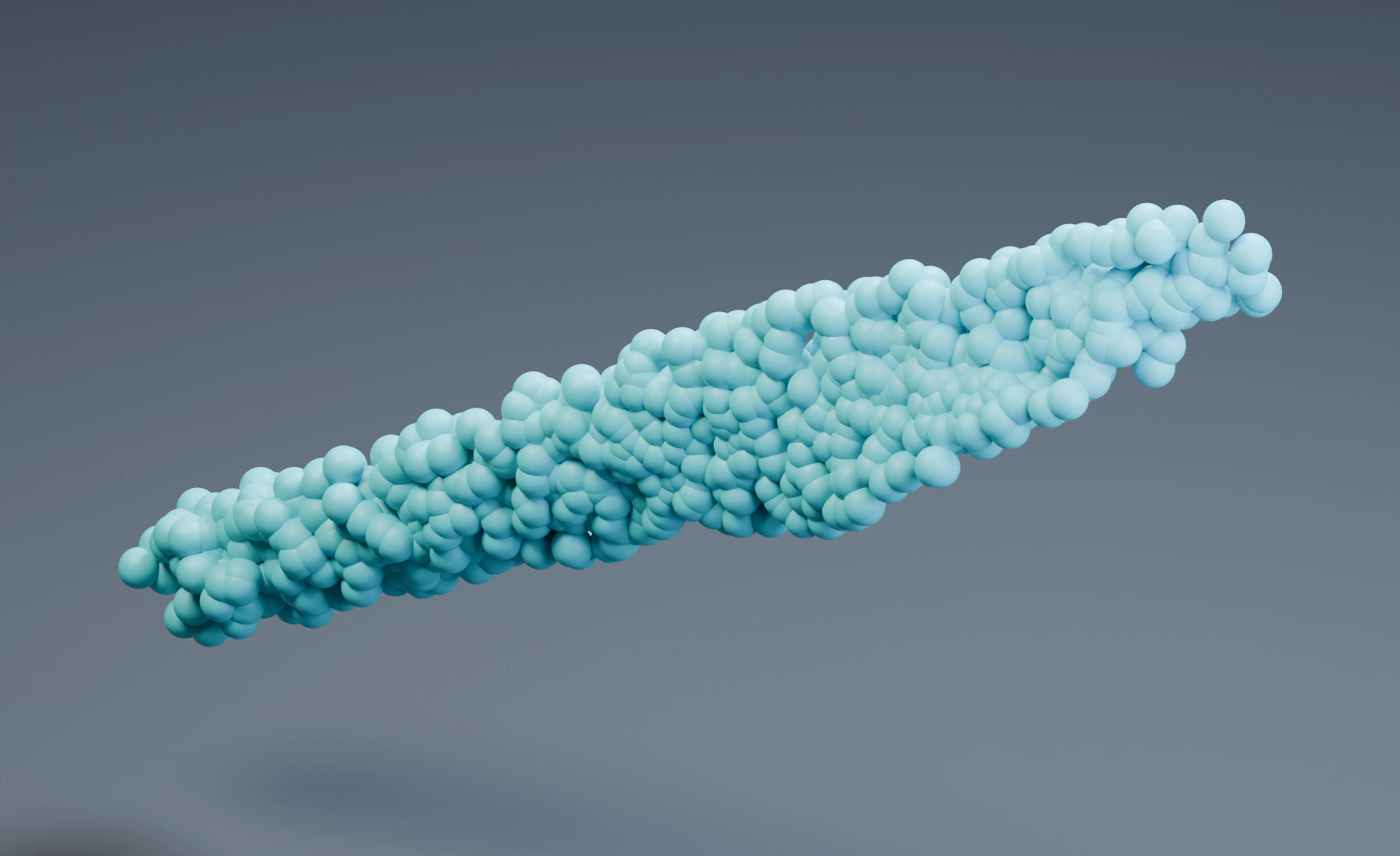
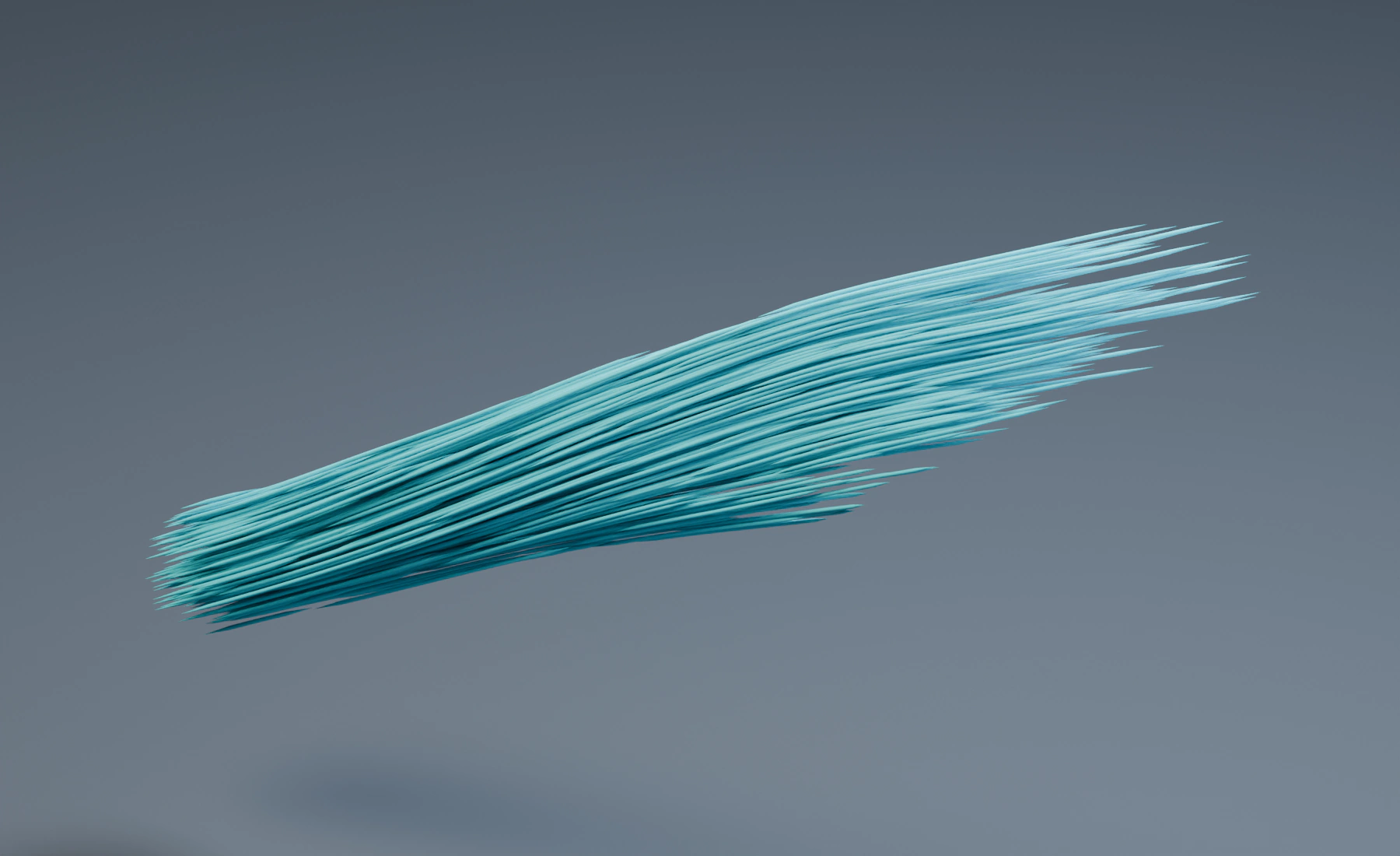
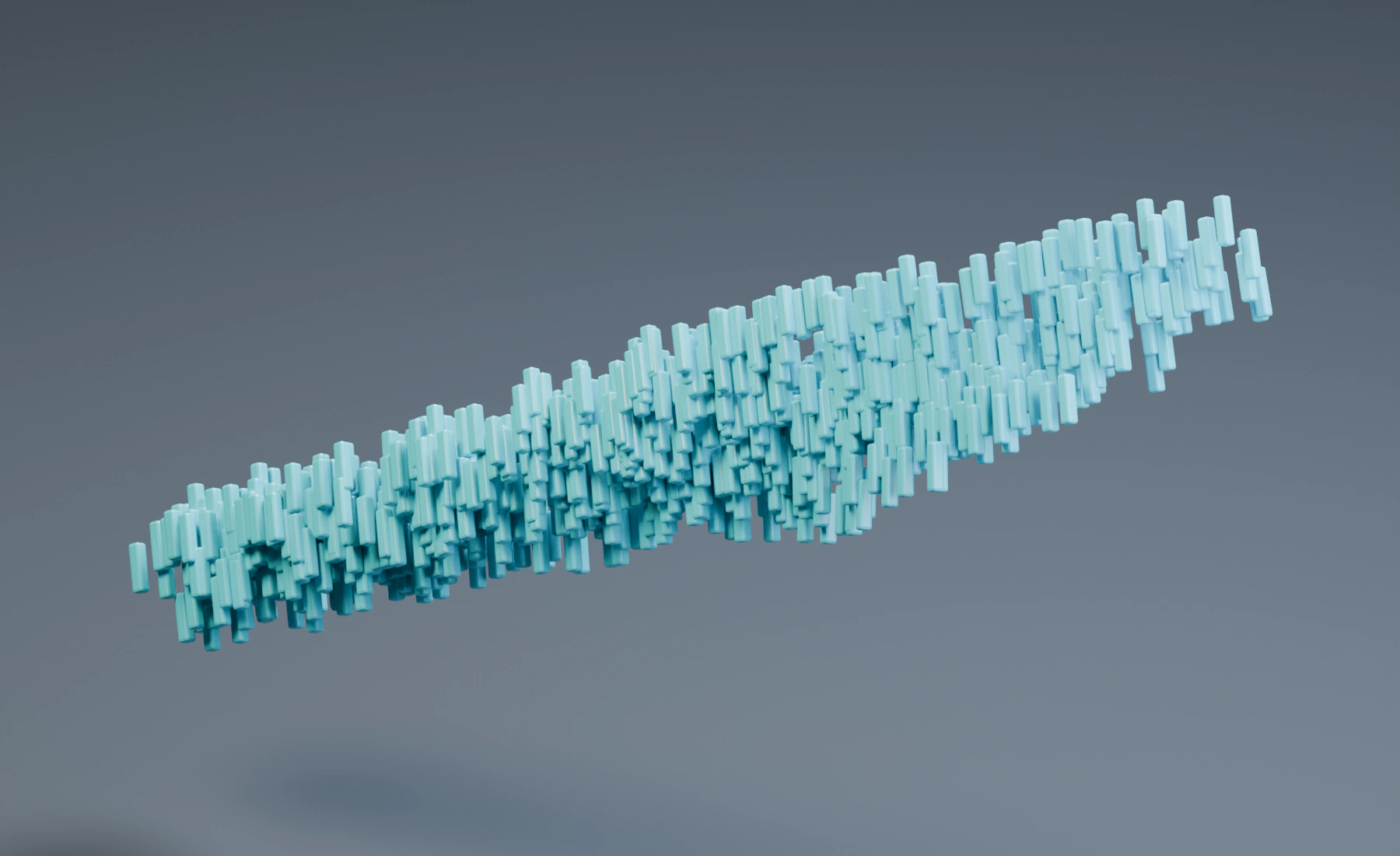
The four views below use the same simulated frame and camera. Only the visible post effect changes. Trails additionally use the recorded motion history. Mesher reconstructs a surface around the particles; it does not add fluid physics.
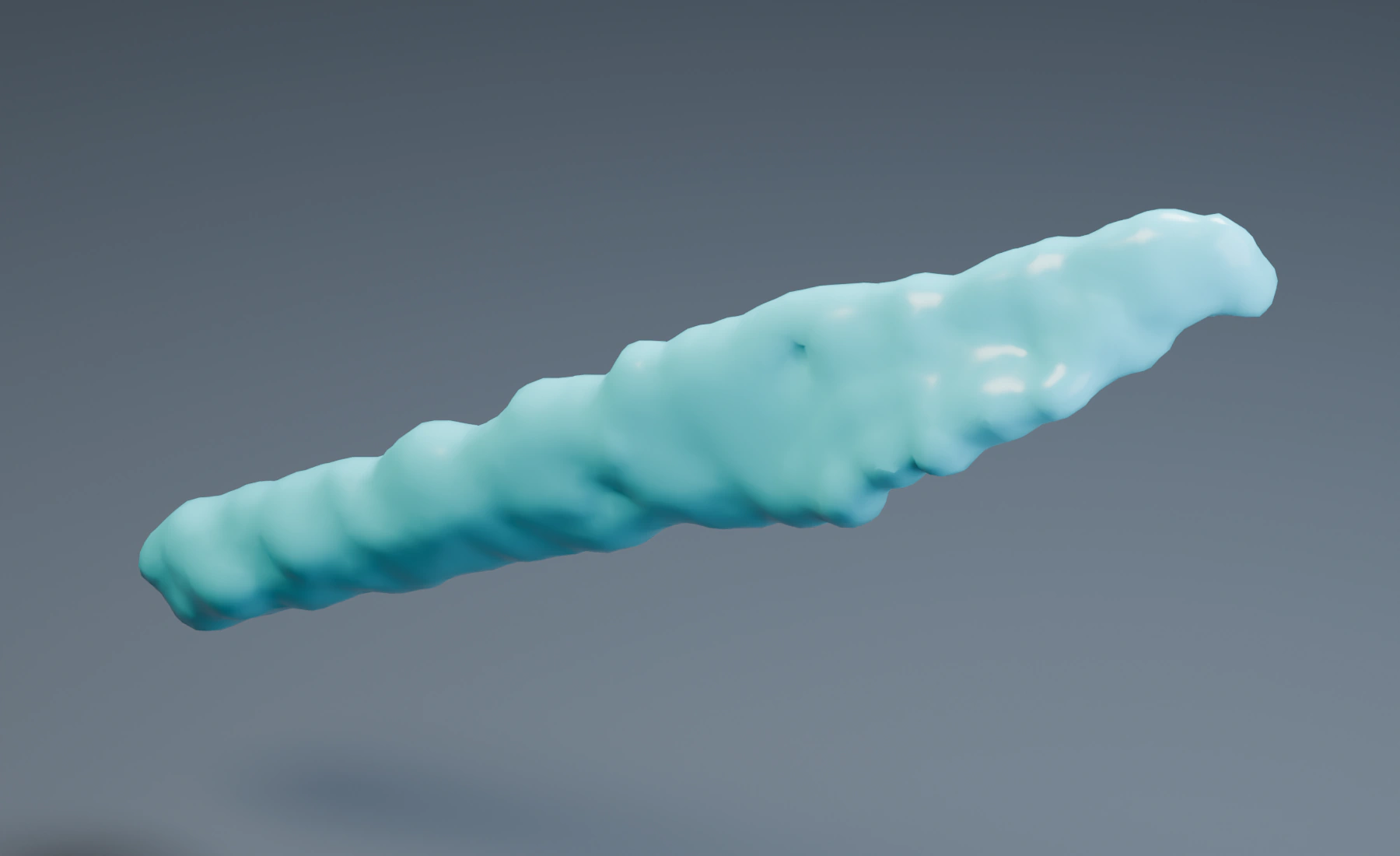
Common Particle Filters
Groups(Filter Groupsin the stored setting): enables a list of named particle groups included by the post effect.Emitters(Filter Emittersin the stored setting): enables a list of emitters included by the post effect.- An enabled filter with an empty list shows no particles. You can add up to eight entries per list; repeated groups or emitters do not change the result.
Group and Emitter filters are inclusive within their own lists. Enable a filter only when the post effect should be restricted. An accidentally enabled empty filter is a common reason for an otherwise valid post effect to show no result.
Point Cloud
Use Point Cloud for direct particle inspection, simple point rendering, downstream Geometry Nodes work or a geometry source for caching. GPU Preview avoids Blender-side geometry generation; Blender Geometry creates the target object and is the correct choice when attributes must be consumed by Blender.
Result
Display: GPU Preview or Blender Geometry.Target: Blender object receiving the geometry output when Display is Blender Geometry.- Particle Filters: Groups and Emitters lists.
Appearance
Material: material used by the Blender Geometry point cloud.Viewport Shape: Point, Square, Velocity Line, Box, Solid Box, Circle, Filled Circle, Pyramid, Solid Pyramid, Velocity Arrow, Solid Velocity Arrow, Axes, or Sphere.Size From: Particle Radius or Fixed.Radius Scale: multiplier when particle radius is used.Radius: uniform point radius when Size From is Fixed.Debug View: in GPU Preview, switch from normal color to Speed, Group ID, or Emitter ID colors. Speed uses a blue-to-red heatmap; groups and emitters receive distinct, consistent colors. The display updates on the current frame without advancing the simulation.Speed Max: in the Speed debug view, choose the speed shown as red.Color From: Particle or Custom.Color: custom point color.
Geometry Attributes
Profile: Basic, All, or Custom; Position is always present.- Custom Core: Radius, Color, Velocity, Rotation, ID. The generated particle-color field is named
col. Use a Named Attribute node in Geometry Nodes or an Attribute shader node set toGeometryin materials. - Custom Simulation: Life, Group ID, Mass.
- Particle Info: Emitter ID, Age, Lifetime, Scale, Angular Velocity, Distance Traveled, Fluid Density, Full Particle ID and Stable Random. All includes these channels only when Extended Channels is enabled.
- Custom Pyro: Smoke, Temperature, Fuel, Flame.
- Custom User Data: User Float 1, User Float 2, User Integer, User Vector.
Start with Basic and add only attributes consumed by the material, Geometry Nodes graph or export. All is convenient for inspection but creates more Blender-side data than a narrowly selected Custom profile. Position is always present, so it does not need a toggle.
Use Particle Info in the Shader Editor and Geometry Nodes to access these fields without entering attribute names. Color remains stored as col.
Trails
Trails can trace particle motion or connect particles. Particle Trails records each particle over time. The other modes connect particles at the current frame or follow their constraint links. Choose the mode first: history controls apply to Particle Trails, while connection modes use their own neighborhood and link settings.
Result
Display: all Trail modes support GPU Preview and Blender Geometry.- Particle Trail history follows every simulated frame during playback, even when a scene runs more slowly than real time. Moving the timeline to another frame rebuilds the history; Blender Geometry refreshes after catch-up reaches that frame.
- Particles disappear from GPU Preview when they reach the end of their lifetime.
Style: Line or Tube for both GPU Preview and Blender Geometry.MaterialandTarget: geometry-output material/object.- Particle Filters: Groups and Emitters.
Links
Mode: Particle Trails, Straight Sequence, Segmented Sequence, Multiple Sequence, All Points, Nearest Index, Nearest Distance, Cluster, or Constraint Links.- All Points in GPU Preview: draws every pair only up to 1,000 active particles. Multiple All Points effects share the same preview work limit. If it is exceeded, the preview is skipped to keep the viewport responsive. Choose Nearest Index for larger simulations; All Points in Blender Geometry still creates every pair and can become very large.
- Particle Trails:
Length By= Time/Distance,Full Scene,Length,Random Life,Length Seed,Length Variation,Frame Sampling, andAt Trail Limit. If At Trail Limit freezes the particle,Freeze MovementandFreeze Radiuscontrol what is held. - Segmented Sequence:
Segment LengthandGap Length. - Multiple Sequence:
Sequence ModeandSequences. Sequential mode additionally usesParticles per Sequencefor contiguous stable-ID ranges. - Nearest Index / Nearest Distance:
Max Connectionslimits links contributed per particle.Skipsteps through stable-ID candidates for Nearest Index and through distance-sorted candidates for Nearest Distance; Nearest Distance also addsMinimum DistanceandMaximum Distance. - Cluster:
Cluster Distance,Minimum Cluster Size, andMax Connections. - Constraint Links: visualizes Particle Constraints and Granular Bonded Clumps topology. Structural, Elastic, and Granular bonds use their exact persistent pairs; Distance, Friction, Viscosity, and Cohesion build the current neighbor graph from the active constraint radius, Apply to scope, and Max Neighbors limit. Granular bonds appear under the
StructuralConstraint filter. Destination Groups: All, Same, Different, Specific, or Except; Specific/Except add a namedDestination Group.
Shape
Thickness: None, Constant, Profile, current particle radius, or recorded/variable particle radius depending on the selected trail mode.Thickness/Maximum Thickness/Radius Scale: thickness value for the selected mode. Profile exposes an editable Thickness Profile curve that multiplies Maximum Thickness.Profile By: Particle Trails can evaluate the thickness profile by Spline Length or Point Age; connection modes always evaluate it by spline length. Age mode addsAge Range.Variation,Start Fade,Start Roundness,End Fade,End Roundness,Fill Caps: tube-end/profile controls.Spline: Linear, Bezier, or B-Spline.Close Spline: closes eligible generated curves.Intermediate Points: None, Uniform, or Adaptive; Uniform addsPoints, Adaptive addsAngle.Maximum Spline Lengthcaps generated curves to the requested world-space length, including partial end segments.Tube Sides: tube-side count used by GPU Preview and Blender Geometry.
Tune topology before increasing shape detail. Frame Sampling, connection count and intermediate points determine how many curve points exist; Tube Sides and Fill Caps multiply the geometry built around those curves. To reduce geometry cost, check both the number of curve points and the tube detail.
Color & Attributes
Particle Color: uses particle color directly. Particle Trails can sample Current or Recorded color; connection modes use the current color at each endpoint.- When
Particle Coloris disabled,Modeselects Solid or Gradient custom color. Solid usesColor; Gradient uses the Color Ramp with Presets. RadiusandColorGeometry Attributes can be written to curve output; particle color is stored ascol. Topology and position are always present.- Particle Info: records selected particle attributes at each Trail sample. Enable before simulation; changing the selection starts a new attribute history. See Particle Info for attribute behavior and memory use.
Instance
Instance assigns one source choice and transform to each selected particle. It reads particle radius, color, rotation or velocity only when the corresponding From mode requests that data. This makes emitter birth properties and later Spin, Scale or Change Color effects part of the instance workflow.
Result
Display: GPU Preview or Blender Geometry.Target: Blender geometry target.Realize Instances: converts geometry instances to realized geometry when needed.Scale: global instance scale.Source Seed: stable source-selection/randomization seed.- Particle Filters: Groups and Emitters.
Sources
- Source layers can be added, removed, and reordered.
Source: Object or Collection; choose the corresponding Object/Collection.Separate Children: treats collection objects as separate source choices.Reset Child Transforms: ignores collection-child rotation/scale when establishing the source shape.Weight: relative selection probability for this source layer.Scale From: Particle, Source, or Custom; Custom exposes XYZScale.Scale Variation,Per Axis, and per-axisVariation.Color From: Particle, Source, or Custom; Custom exposesColor.Color Variation,Per Channel, and RGBVariation.Material OverrideandShading(Source / Smooth / Flat) apply to Blender Geometry output.Rotation From: Particle, Velocity, Source, or Custom; Custom exposesRotation.Rotation Variation,Per Axis, and XYZVariation.Forward Axis: local source axis used when velocity alignment, Align to Object, or billboarding needs a forward direction.Freeze Source AnimationandFrozen Frame: lock animated source geometry to a chosen frame.
Source Weight values are relative probabilities, not counts. With weights 1 and 3, the second enabled layer is selected about three times as often. Source Seed changes that stable selection without changing particle IDs. Keep Realize Instances disabled unless a downstream operation needs real geometry, because realization can multiply memory use by the full source geometry for every particle.
Orientation
Rotation Offset,Random Rotation,Rotation Seed.Align to Object: enables alignment toObjectwithStrengthandPivot(Auto/X/Y/Z).Billboard: Off, Lock Roll, or Full; non-Off modes exposeCamera.
Orientation is resolved from Rotation From, followed by Rotation Offset and deterministic random rotation, then optional object alignment or billboarding. Set the source's Forward Axis correctly before compensating with offsets. A wrong forward axis otherwise makes velocity alignment, target alignment and billboarding all appear consistently rotated.
Geometry Attributes
Instance uses the same Basic / All / Custom particle Geometry Attribute profile described for Point Cloud.
Mesher
Mesher reconstructs one surface from particles, a Pyro scalar field, or several ordered layers. Its Voxel Size belongs to output reconstruction and does not change FLIP, MPM or Pyro simulation resolution. Tune the simulation first, then choose the coarsest Mesher resolution that preserves the final silhouette.
Surface
Display: GPU Preview or Blender Geometry.Target: Blender mesh target for geometry output.Material: surface material.Voxel Size: reconstruction resolution.Surface Level: isosurface threshold.Reconstruction: Spheres, Zhu-Bridson, or Anisotropic.Topology: Triangles or Quads.Radius: Particle Radius or Fixed Radius; Fixed exposesFixed Radius;Radius Scalemultiplies reconstruction size.- Zhu-Bridson:
Center Correction. - Anisotropic:
Speed Influence,Eccentricity, andMaximum Speed. Smooth Shading: smooth vertex shading on Blender mesh output.
Spheres is the direct particle-kernel reconstruction. Zhu-Bridson adds neighborhood-center correction for a smoother liquid surface. Anisotropic stretches reconstruction kernels from local motion; use Speed Influence, Eccentricity and Maximum Speed together so fast regions elongate without distorting calm areas.
Collider Contact
Enable Collider Contact in Surface to close small gaps between reconstructed particle surfaces and colliders. It is disabled by default and changes only the generated mesh, not the simulated particle motion.
Colliders: Automaticuses enabled Collision and Dynamic Collider effects that apply to the contributing particles' Group or Emitter. Particle source selections in Layers still apply.Colliders: Manualreplaces automatic selection with an Object or Collection. Select a separate render surface here; the selected mesh does not become a simulation collider.Maximum Distancelimits the gap correction near particles touching a surface. Zero disables correction. Increasing it does not pull distant or freely airborne particles onto a collider.Surface Offsetsets the contact surface position. Zero targets the collider surface, positive values leave a small gap, and negative values create a slight overlap. Its magnitude is limited by Maximum Distance.
Start with Surface Offset at zero and a Maximum Distance comparable to the visible gap. Contact surfaces follow the collider faces, including sloped surfaces. Use a smaller Voxel Size if the contact outline or curved features are too coarse. Very small gaps, corners and thin features remain limited by reconstruction resolution. Detailed colliders and smaller Voxel Size increase meshing time. Excessive correction can broaden the visible contact area. Coincident surfaces can cause artifacts with transparent materials; adjust Surface Offset for the intended render.
Collider Contact requires a contributing Particle layer. A Pyro Volume-only Mesher is unaffected. In Lists and Nodes, the controls are in the same Mesher Surface section; automatic selection follows the simulation effects available to that Mesher.
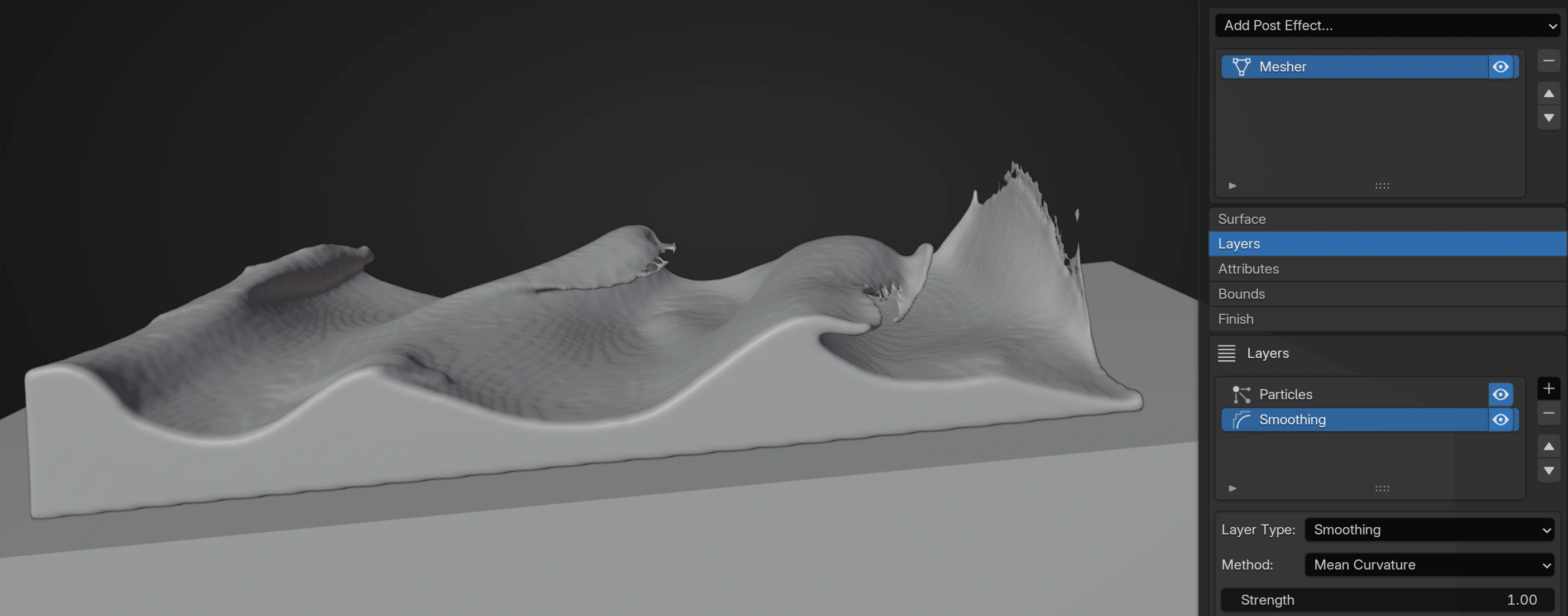
Layers
- Particle layer:
Particles= All / Group / Emitter / Fluid. Group selects a named Group; Emitter selects an Emitter and can exposeWeight Attribute; Fluid selects a fluid effect. Each layer hasRadius Scale,Combine(Add/Union/Subtract), andWeight. - Pyro Volume layer:
Field= Smoke / Temperature / Fuel / Flame,Surface Threshold, Combine, and Weight. - Smoothing layer:
Method= Gaussian / Laplacian / Mean Curvature, plusStrength,Iterations, andRadius.
Layer order matters. Particle and Pyro Volume layers add, unite or subtract scalar contributions; Smoothing processes the accumulated field at its position in the layer stack. Place subtraction before smoothing to soften the cut, or after smoothing to keep it sharp. A Fluid particle layer references the chosen fluid effect rather than only a named particle group.
Attributes
ColorwithColor Blur. Blender Geometry stores the resulting color attribute ascol.VelocitywithVelocity Blur.Limit Velocitywith XYZMaximum Velocity.
Attribute transfer samples the contributing layer data onto the extracted surface. Color Blur and Velocity Blur smooth attributes independently from surface smoothing. Limit Velocity is useful when isolated reconstruction samples would otherwise produce extreme motion-blur vectors.
Bounds & Clipping
Bounds: Automatic or Object; Object exposesBounds Object.Padding: extra reconstruction domain margin.Open Sides: -X, +X, -Y, +Y, -Z, +Z toggles.Boundary Trim: removes surface cells near open sides.- Clip Volumes: ordered list of
Objectclips with optionalInvert. Small openings and minor surface defects are repaired automatically. Flat or unrepairable volumes produce an error.
Automatic bounds follow the source field and are convenient for moving liquid. Object bounds provide a stable reconstruction box for fixed framing or predictable open sides. Clip Volumes remove or retain closed regions after field construction; they are a presentation operation and do not collide with the simulated particles.
Surface Cleanup
Remove Small PartswithMinimum Faces.Water LevelwithLevel,Influence Distance,Maximum Offset, andStrength.
Remove Small Parts is intended for disconnected reconstruction islands, not for changing particle lifetime. Water Level gently corrects the extracted surface near a world-space height and should be kept within a small Maximum Offset so it does not flatten intentional waves.
Upres
Upres creates persistent render-only detail particles after simulation. It does not change the physical solver result and is intended as a downstream source for post effects and outputs.
Begin with a low Children count and a finite Maximum Particles. Increase Reconstruction Radius until local flow is coherent, then use Surface Preservation, Flow Coherence and Density Adaptation to keep detail attached to the source structure. Relax Distribution is an additional spacing correction, not a physical particle interaction.
Filter: All Particles, Particle Group, or Emitter. Group/Emitter modes expose the corresponding named selector.Children: persistent detail particles carried by each selected live source particle.Strength: scales the child count; zero bypasses Upres.Maximum Particles: hard limit for the complete downstream stream including source particles.Maximum Distance: maximum initial detail spread.Position Variation: varies the stable birth pattern.Seed: stable detail-pattern seed.Field Interpolation: blends local source attributes/flow.Reconstruction Radius: neighborhood radius used to estimate local flow, density, and source structure.Surface Preservation: keeps persistent detail constrained to the current local source shape.Flow Coherence: keeps detail transport coherent through local source motion.Density Adaptation: corrects detail spacing from source density.Relax Distribution: optional additional spacing relaxation withRelax StrengthandRelax Distance.- Detail Particles:
Child Size,Velocity Variation,Radius Variation,Mass Variation,Color Variation. Emitter Assignment: Inherit Source or Destination Emitter; Destination exposes the emitter selector.Inherit Group: keep source groups; disabling it exposes a destination named Group.Inherit User Data: preserves User Float ½, User Integer, and User Vector on detail particles.
Check Emitter Assignment and Inherit Group when later filters target the upres particles. Reassigning them makes a downstream post effect or output treat them as a separate population; inheriting preserves the original source identity. User Data is retained only when Inherit User Data is enabled.
Dendrite Output
Dendrite Output draws the canonical branch history generated by one Dendrite simulation effect. It does not infer branches from arbitrary nearby particles. Select the correct Source when the scene contains more than one Dendrite effect.
Source: selects the Dendrite simulation effect whose canonical branch history is displayed.Display: GPU Preview or Blender Geometry.Style: Line or Tube for GPU Preview.Target: Blender curve/geometry target when using Blender Geometry.Material: material for Blender Geometry output.- Blender Geometry stores Dendrite point color as
colfor shader access.
Troubleshooting
- Nothing is visible: check Display mode, target assignment and enabled Group/Emitter filters. An enabled filter with no selected groups or emitters selects nothing.
- A Nodes post effect is red: connect the final merged stream after every simulation effect. Post effects cannot capture an intermediate branch.
- Output Cache rejects a particle stream: place a geometry-producing post effect such as Point Cloud before Output Cache. Raw ordinary particles are not a cache geometry source.
- Trails use too much memory: reduce trail Length or Frame Sampling density first, then connection counts, intermediate points and Tube Sides.
- Instances face sideways: correct Forward Axis before adding Rotation Offset.
- Mesher is slow: increase Mesher Voxel Size, tighten bounds and inspect layer count before lowering simulation resolution.
- Upres changes the physics: it should not. Verify that you are judging a downstream presentation stream and not mistaking added detail particles for physical carriers.