Strands Support Net
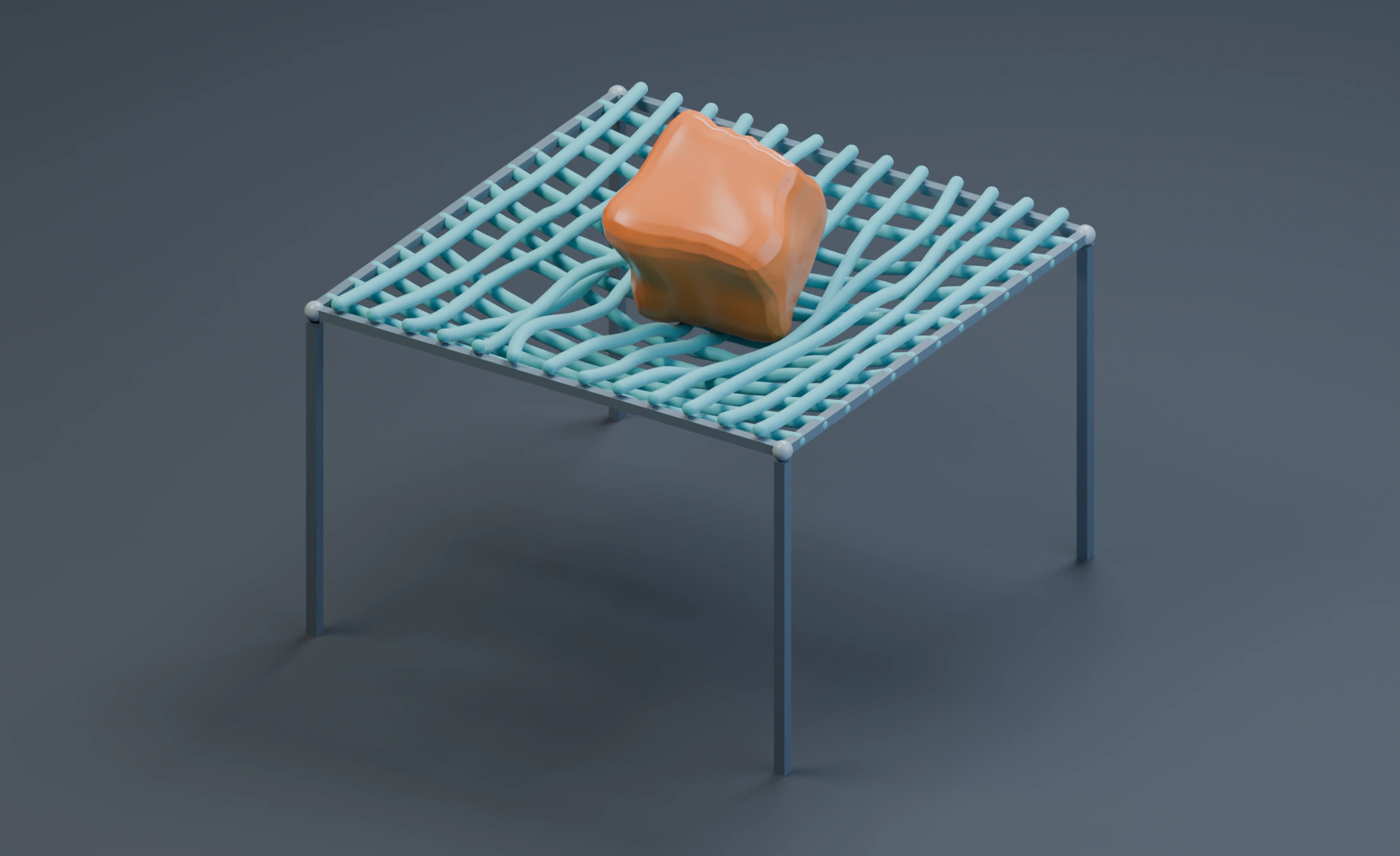
Arrange pinned strands into a support net and let a Soft Body land on it. The two curve families remain separate strands, with contact keeping them apart.
Build the net source
Use a new Blender file, Start with Lists, 24 fps, frames 1–56, and scene Substeps 8. Remove the default cube. The Strands tutorial explains pinning with a single spline.
- Create one 3D Curve object with 13 open poly splines running along X. Each spline has 41 evenly spaced points from X = -2 to 2 m. Place the splines 0.3 m apart, from Y = -1.8 to 1.8 m.
- Keep both ends at Z = 2.6 m. Shape each spline into a shallow downward arc. The central spline's middle is 0.45 m below its ends; reduce this sag smoothly toward the outer splines.
- Add a second family rotated 90 degrees around Z and raised by 0.11 m. It has the same spacing and shape. Keep every point Radius at
1, source Bevel Depth at0and object Scale at1. - Leave the crossings unjoined. Each spline is an independent rope, not a welded lattice. The initial layer separation keeps the two families from starting inside each other.
The extra curve length lets the net sag with its ends fixed. To create the illustrated source without placing all 1066 points by hand, use Blender's Scripting workspace. Create a new text, paste the following script, and choose Run Script once. It adds the Curve source only; configure the Emitter in the next section.
import bpy

curves = bpy.data.curves.new("Net Source", "CURVE")
curves.dimensions = "3D"
for axis in (0, 1):
    for row in range(13):
        cross = -1.8 + row * 0.3
        spline = curves.splines.new("POLY")
        spline.points.add(40)
        for index, point in enumerate(spline.points):
            along = -2 + index * 0.1
            z = (2.6 - 0.45 * (1 - (along / 2)**2)
                 * (1 - (cross / 2)**2) + axis * 0.11)
            point.co = ((along, cross, z, 1) if axis == 0
                        else (cross, along, z, 1))
            point.radius = 1
net = bpy.data.objects.new("Net Source", curves)
bpy.context.scene.collection.objects.link(net)
Skip the manual construction if you use the script. In either case, keep all 26 splines in the same Curve object.
Configure Strands
Set the starter Emitter Type to Strands, and assign Net Source under Curve Sources. Set Start Frame 1, zero Initial Velocity and Display: Geometry.
Choose Rope first, then override:
| Control | Value |
|---|---|
| Radius | 0.05 m |
| Density | 2 |
| Damping | 0.5 |
| Bending Stiffness | 0.08 |
| Solver Quality | 8 |
| Pin Points / Pin Strength | Roots & Tips / 1 |
| Segment Resolution / Guide Density | Full / Full |
| Self Collision / Deformable Interaction | On / On |
| Particle Interaction / Pyro Interaction / Breakage | Off / Off / Off |
Keep the Rope preset's Stretch Stiffness 0.995 and Twist / Torsion 0.55, and Collision Friction 0.25. Leave Attach To and Spatial Maps empty. The frame and stands only mark the fixed endpoints; they are not Collision objects.
Add the Soft Body and ground
- Create a cube named
Soft Body Source, Dimensions(1.15, 1.15, 1.15), Location(0, 0, 3.4), and apply Scale. - Add and apply Bevel, Width
0.18 m, Segments3. - Add and apply Subdivision Surface, type Simple, Levels
3, then use Shade Smooth. The dense surface provides contact points along the ropes. - Add a second Emitter of Type: Soft Body and assign the rounded cube as a Surface source under Mesh Sources. Use Simulation Resolution: Full, Start Frame
1, zero Initial Velocity and Display: Geometry. - Set Damping
0.5and Collision Thickness0.09 m.
Keep Local XPBD, Density 1, Solver Quality 8, Volume Resolution 12, Volume Stiffness 0.9, Shape Stiffness 0.3, Collision Friction 0.25 and Deformable Interaction enabled. Disable Self Collision, Particle Interaction, Pyro Interaction and Plasticity.
Add a cube named Ground, Dimensions (16, 16, 0.3), Location (0, 0, -0.15), and apply Scale. Add Gravity, Force (0, 0, -9.81), followed by Collision using Ground, Bounciness 0 and Friction 0.5. Enable the Strands and Soft Body domains on both effects. Both Emitters supply Geometry directly; no Trails, Point Cloud or Mesher is needed.
Play the supported drop
Play from frame 1 to 56. The cube lands on the net, deforms, and pushes the supporting strands downward. Their roots and tips stay fixed. Save the project after the setup is complete. Assign materials to the two source objects for the illustrated teal ropes and amber cube.
Thin strands, coarse surface sampling and fast impacts can miss contact. This setup uses thicker strands, a denser Soft Body surface and eight scene Substeps, so it costs more simulation time than the single-rope lesson. If the cube passes through, first check Deformable Interaction on both Emitters. Then inspect its surface sampling, the strand radius and Substeps. Replay from frame 1 after changing the source or contact settings.
Self Collision prevents strand overlap but does not weld intersections. Use Cloth when a continuous sheet with connected surface topology is the intended material.
Nodes setup
Use Curve Source → Emitter (Strands) and Surface Source → Emitter (Soft Body), connecting Source to Sources. Merge their Particles streams with Merge Disjoint Streams before Gravity and Collision, enable both domains, and connect the final stream to Simulation Output / Particles. Connect both Emitter Geometry outputs to Simulation Output / Geometry.
The scene shown here uses Lists. To build it in Nodes, create the graph and enter the settings again.
See Strands reference and Granular Load on Cloth for particle-to-fabric contact.