Fields, Streams and Masks
Use these nodes to split and merge particle streams, control effect order, and share values, masks and colors across a setup.
Where to find it
Use Shift+A > Fields & Streams for branching, constants, Fields, Advanced Color and Deformable Map. Concrete mask nodes and Mask Blend are under Shift+A > Masks.
Streams, values, colors and masks
| Family | Use it for |
|---|---|
| Stream | split and merge particle streams, or control their evaluation order |
| Value / Field | share uniform values or reusable per-particle mappings |
| Advanced Color | share color operations between nodes |
| Masks | construct and combine reusable 0–1 selection/influence expressions |
Stream nodes
Emitter Branch
Input: Particles
Outputs: Selected, Remaining
Choose one Emitter from the incoming population. Selected contains only that emitter's particles; Remaining contains every other emitter represented by the input stream. The selected emitter must actually belong to the incoming stream.
The two outputs select different particles from the same simulation; they do not duplicate particles. Process them independently only with effects that support partial branch scope, then reunite them before any complete-stream solver, post effect or Simulation Output.
Merge Disjoint Streams
Inputs: First, Second
Output: Particles
Reunites non-overlapping emitter populations. The inputs must be disjoint. If both paths contain any of the same emitter population, the graph reports an overlap error; use Order Shared Stream for two paths acting on the same population.
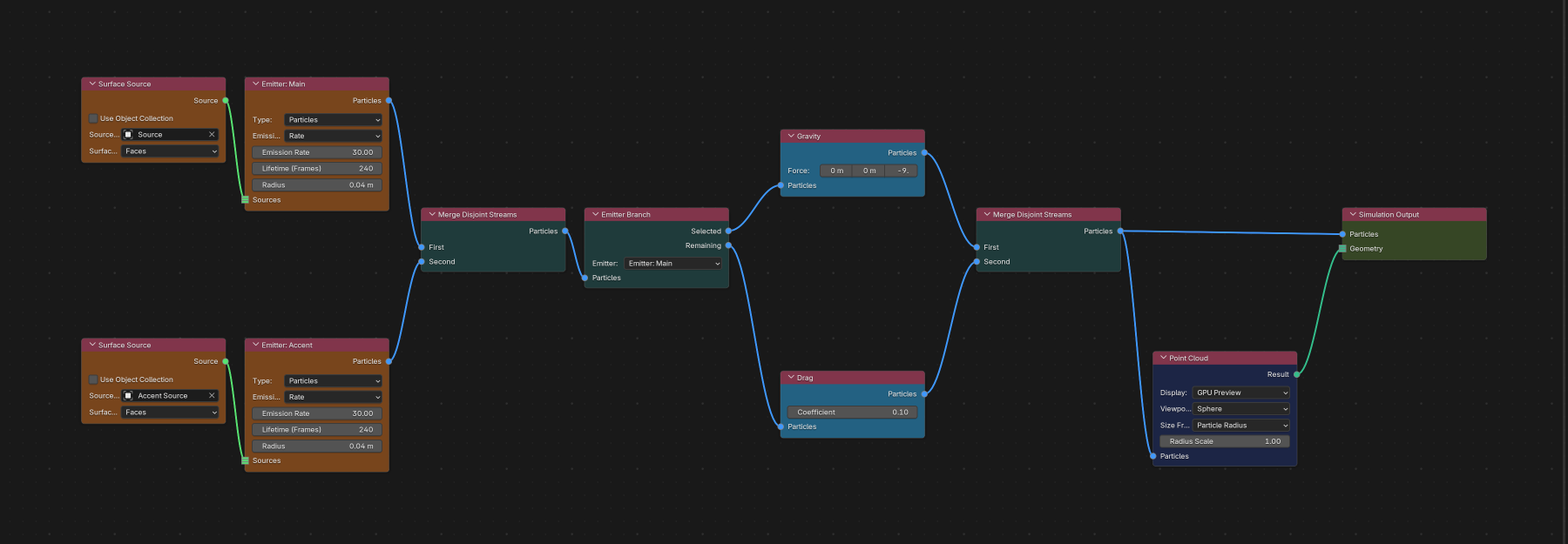
Order Shared Stream
Inputs: First, Second
Output: Particles
Runs First before Second when both paths affect the same emitter population. Both inputs must cover the same particles. Order cannot reverse an existing upstream dependency; swap First and Second when Graph Diagnostics reports that conflict.
Use Order when graph topology needs to state which of two shared-population paths happens first. It does not duplicate particles and it is not a general-purpose merge for different emitters.
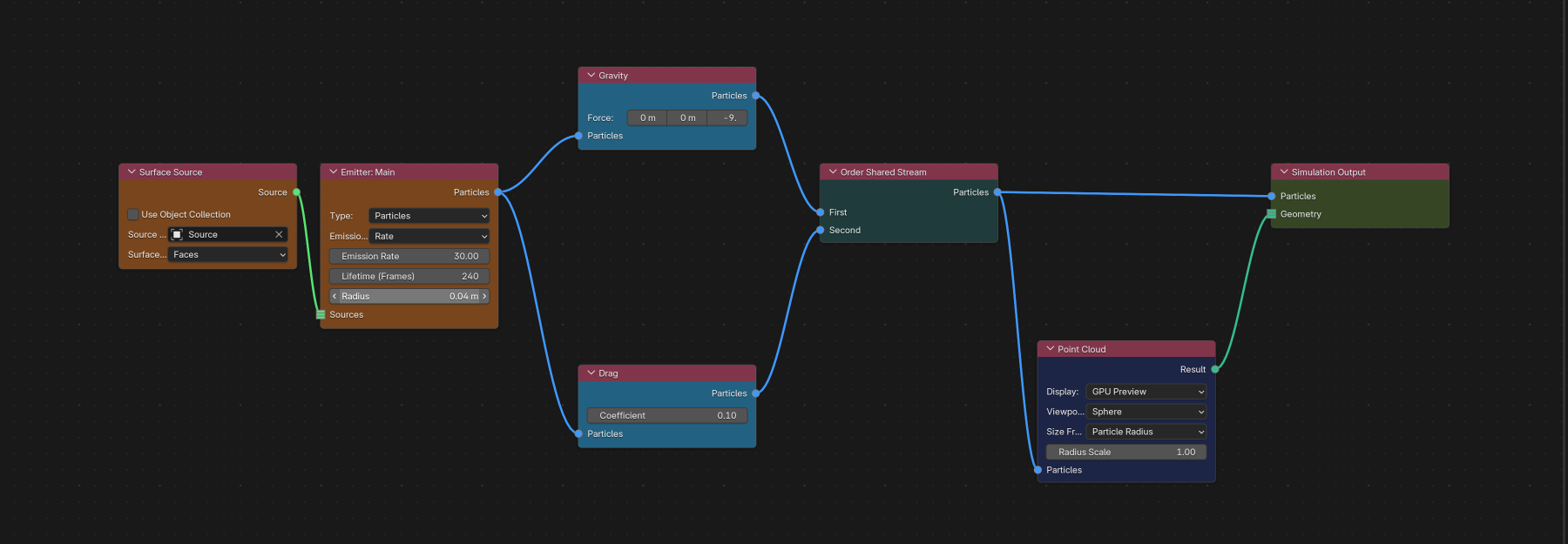
Value and Field nodes
Float Value / Vector Value
Outputs one uniform value that can be reused by compatible inputs. These nodes are appropriate when several parameters should share a single artist-controlled value. They do not create per-particle variation.
Group Value
Select a named Particle Group from the scene's Groups list. The output can feed multiple Group inputs, including inputs exposed on Physics Groups. Renaming the group updates the displayed name while preserving all selections. Group sockets accept only Group connections, so Integer and numeric Field outputs cannot drive them. See Particle Groups.
Float Field / Vector Field
Inputs: Previous, Mask Source
Output: Field
A Field maps particle or scene data to a value that other nodes can use. Connect Fields through Previous to set the order of several mapping operations. With Source: Mask, Mask Source supplies the value of a single or combined Mask. When that socket is unconnected, use Add Mask... to create or reuse masks in the Field's own list.
Supported particle-effect Field targets currently include Gravity Force, Wind Force, Drag Coefficient, Turbulence Strength, Curl Noise Strength and Attractor Strength, plus the deformable Field sockets exposed on Emitter nodes and the Dendrite branch mappings. See Data Mapping.
Deformable Map
Output: Value (Float Field)
Reads a deformable source map and converts its 0–1 weight to the configured Black/White output range. Cloth and Soft Body use a source mesh vertex group. Strands can use the corresponding point-domain attribute from a Curve source.
The node resolves its source context from the material/deformable parameter input it feeds. Connect it to a supported deformable input before browsing source maps. See Cloth, Soft Body & Strands.
Advanced Color
Input: Base Color
Output: Color
Builds one reusable Advanced Color operation. Chain color operations through Base Color, then connect the final result to an Emitter birth Color, Change Color, Collision color override or Emit Children child Color.
A disabled Advanced Color node passes Base Color through. An unlinked consumer Color socket uses that consumer's local color. Duplicating an Advanced Color node creates an independent editable ramp. See Advanced Color.
Mask nodes
Each Mask node outputs Mask and uses the same settings and behavior as its Lists counterpart. Search for the mask type when adding a node.
| Node | Typical use |
|---|---|
| Box Mask | axis-aligned box region |
| Sphere Mask | radial region |
| Noise Mask | procedural spatial breakup |
| Random Mask | stable particle random selection |
| Linear Mask | directional gradient |
| Plane Mask | signed/one-sided plane selection |
| Velocity Mask | selection from particle motion |
| Age Mask | selection from particle age |
| Group Mask | named Particle Group selection |
| Particle Proximity Mask | distance to other particles |
| Invert Mask | list-stack operation; use Invert Output or Mask Blend in Nodes |
| Curve Mask | distance/influence around a curve |
| Object Mask | object-based spatial selection |
| Axis Position Mask | selection from world-axis position |
| Mass Mask | selection from particle mass |
| Time Mask | scene/simulation-time selection |
See Masks for each mask's detailed controls, blend behavior and data availability.
Mask Blend
Inputs: Accumulated, Mask
Output: Mask
Combines two single or composed Mask expressions with Multiply, Add, Subtract, Maximum, Minimum, Normal, Screen, Overlay, Divide or Difference. Both inputs accept further Mask Blend outputs and preserve their grouping. Reuse the result in effect, emitter, Logic, Data Mapping, Material Change or Sleep/Wake inputs. To invert a composed expression, use Subtract with an unconnected Accumulated input set to 1 and connect the expression to Mask.
Emitter masks are evaluated before a particle exists. Connecting a mask that needs post-birth data, such as Age, to an Emitter shows an error.
Stream completion rules
Before the final particle stream reaches a post effect, particle export or Simulation Output / Particles:
- every
Emitter Branchpartition must be represented again; - overlapping paths must use Order Shared Stream, not Merge;
- disjoint emitter populations must use Merge Disjoint Streams;
- every enabled effect branch must contribute to the final stream.
Post-effect filters are the correct way to display or export only one emitter/group after simulation. Do not keep a partial Emitter Branch alive into the post stage.
Troubleshooting
- Merge reports overlap: at least one emitter population exists in both inputs. Use Order Shared Stream if both paths intentionally act on the same particles.
- Order reports different populations: its two inputs do not represent the same emitter scope. Use Merge Disjoint Streams for different partitions.
- Simulation Output reports a missing partition: follow every Emitter Branch output and merge the Selected and Remaining populations back into the final stream.
- A Field input is not visible: that parameter does not support per-particle Fields, or the selected node configuration makes it inapplicable.
- An emitter rejects a Mask: the mask depends on particle data that is unavailable before birth.