Sand Pile with Granular
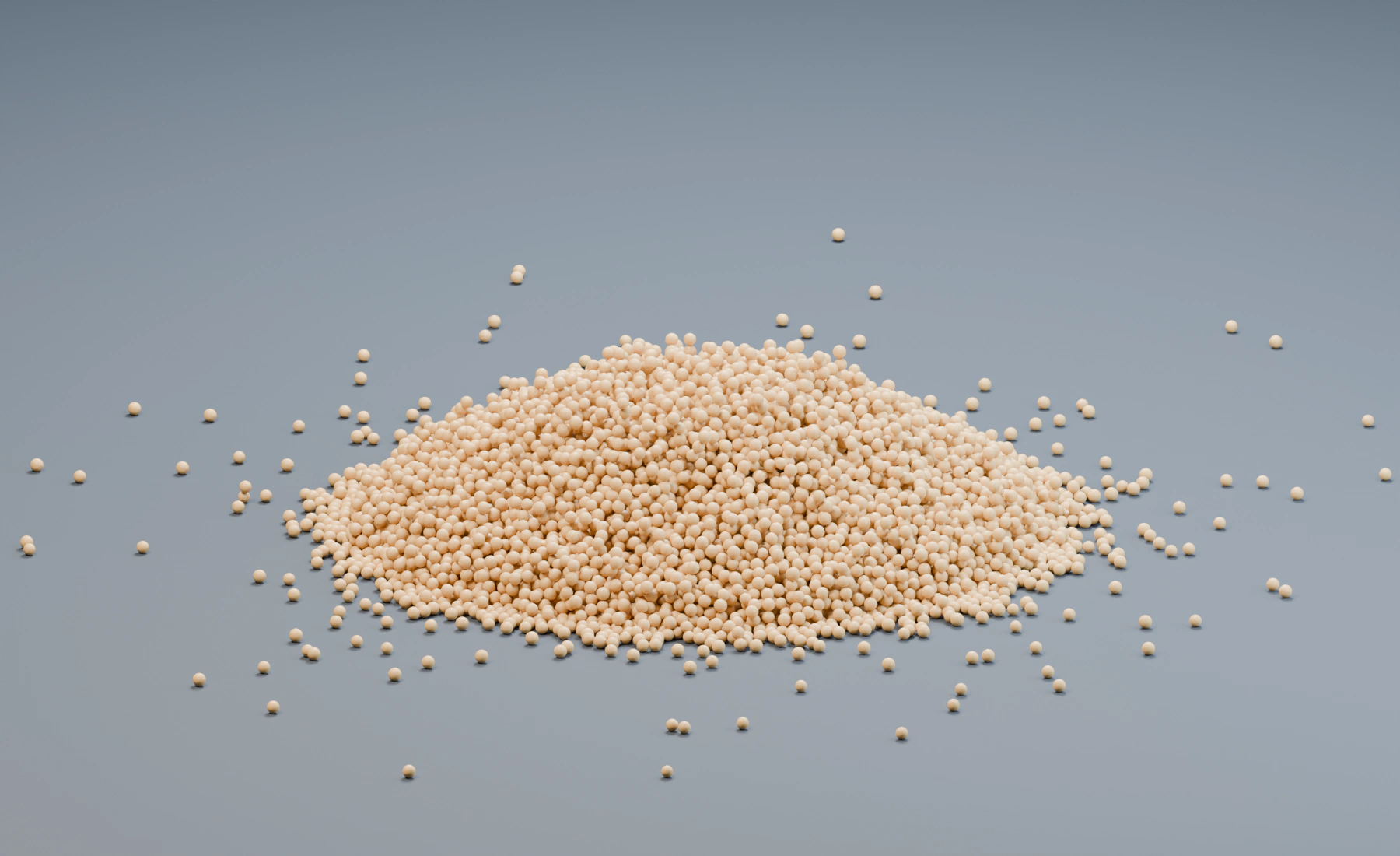
Pour granular particles onto an open ground surface and let particle contact form a free-standing pile.
The pile uses Gravity, Collision, and Granular. There are no side walls, Push Apart, Self Collision, or Drag. The ground supports the lowest grains; Granular supports the grains above them and controls sliding within the pile.
Reference setup
Use 30 fps, Substeps 6, and play frames 1–240. Emission ends at frame 180; the remaining frames allow the pile to settle.
| Part | Settings |
|---|---|
| Ground | Box 40 × 40 × 0.3 m, center (0, 0, -0.15); top surface at Z 0 |
| Volume source | Box 0.6 × 0.6 × 0.15 m, center (0, 0, 2.8); Volume Fill Density |
| Emitter | Rate 100 /f, Start Frame 1, Duration 180, Lifetime 1000 frames |
| Grain size | Radius 0.025 m, Radius Random 0.12 |
| Launch | Initial Velocity (0, 0, -2), Surface Push 0 |
| Collision | Ground object, Bounciness 0, Friction 0.6 |
| Granular | Start with Dry Sand, then set Stiffness 0.9, Friction 0.7, Solver Iterations 10; Activation Frames 5 |
| Point Cloud | Particle Radius and Color; Blender Geometry for the illustrated render |
Evaluation order: Gravity → Collision → Granular. In Lists, this order runs from the bottom of the visible Effects list upward. In Nodes, connect the complete particle stream through those effects and then to Point Cloud and Simulation Output.
1. Establish grain size and the ground
Start a new Lists system. Create cubes named Ground and Pour Source with the dimensions and locations in the table, then apply Scale to both. Assign Pour Source as the Emitter's Volume source. The source is above the ground with clearance for the pile.
Physical Radius determines contact spacing. Changing only the post-effect display size does not change how the pile stacks.
Use a source wide enough for the chosen Rate. A very narrow source emitting many overlapping grains can produce a burst of separation before they reach the pile.
2. Configure the pour
Choose Volume Fill: Density and enter the Rate, timing, radius and launch settings in the table. Keep lifetime Variation 0 and Random Velocity (0, 0, 0). Add Gravity with Force (0, 0, -9.81) and Collision using Ground, then Granular above them in the visible stack.
Grid and Hexagonal fill the source volume at the start and produce a different release pattern. Lifetime 1000 keeps grains alive throughout the pour and settling range. The downward Initial Velocity gives the pour a consistent launch direction.
Check the first frames with a lower Rate if needed. Grains should fall onto the ground and remain above its top surface before dense piling begins.
3. Enable Granular contact
Choose Dry Sand, then enter the reference overrides above. Stiffness resists compaction; Friction controls sliding between grains. The reference raises both to retain a clear pile at this particle size. Cohesion and Viscosity remain zero.
Activation Frames softens the initial contact correction. Solver Iterations repeats contact solving per substep. Increase Substeps or iterations only when the visible contact needs them, since both increase simulation cost.
4. Inspect the moving result
Compare frames 1, 120, and 240. At frame 120, the pour is still active. At frame 240, motion should have reduced and the middle of the pile should stand above its outer skirt. Inspect the side profile as well as a three-quarter view. No surrounding collider should be supporting that profile.
The image uses Point Cloud geometry, a camera, and area lights. This presentation does not add collision geometry or change the granular solve. GPU Preview remains useful while tuning the simulation.
For Nodes, connect Volume Source → Emitter → Gravity → Collision → Granular. Feed Granular's particle output to Point Cloud and Simulation Output / Particles, and Point Cloud Result to Simulation Output / Geometry. Enter the same settings; Lists and Nodes do not copy them automatically.
Troubleshooting
- Grains spread into a thin layer: Check physical Radius, emission count, and Granular Friction. A small number of coarse grains cannot show the same pile structure as a sufficiently resolved pour.
- The pour sprays outward at birth: Widen the source or reduce Rate and initial overlap before increasing solver quality.
- Contact remains soft or the pile keeps compacting: Check Stiffness, Substeps, and Solver Iterations.
- Grains pass through the ground: Check ground thickness, normals, particle speed, and Substeps.
- Grains form wet clumps: Check that Cohesion and Viscosity are zero for this dry-sand example.
See Granular Sand and Snow for cohesive material comparisons and Granular for the control reference.