Granular Load on Cloth
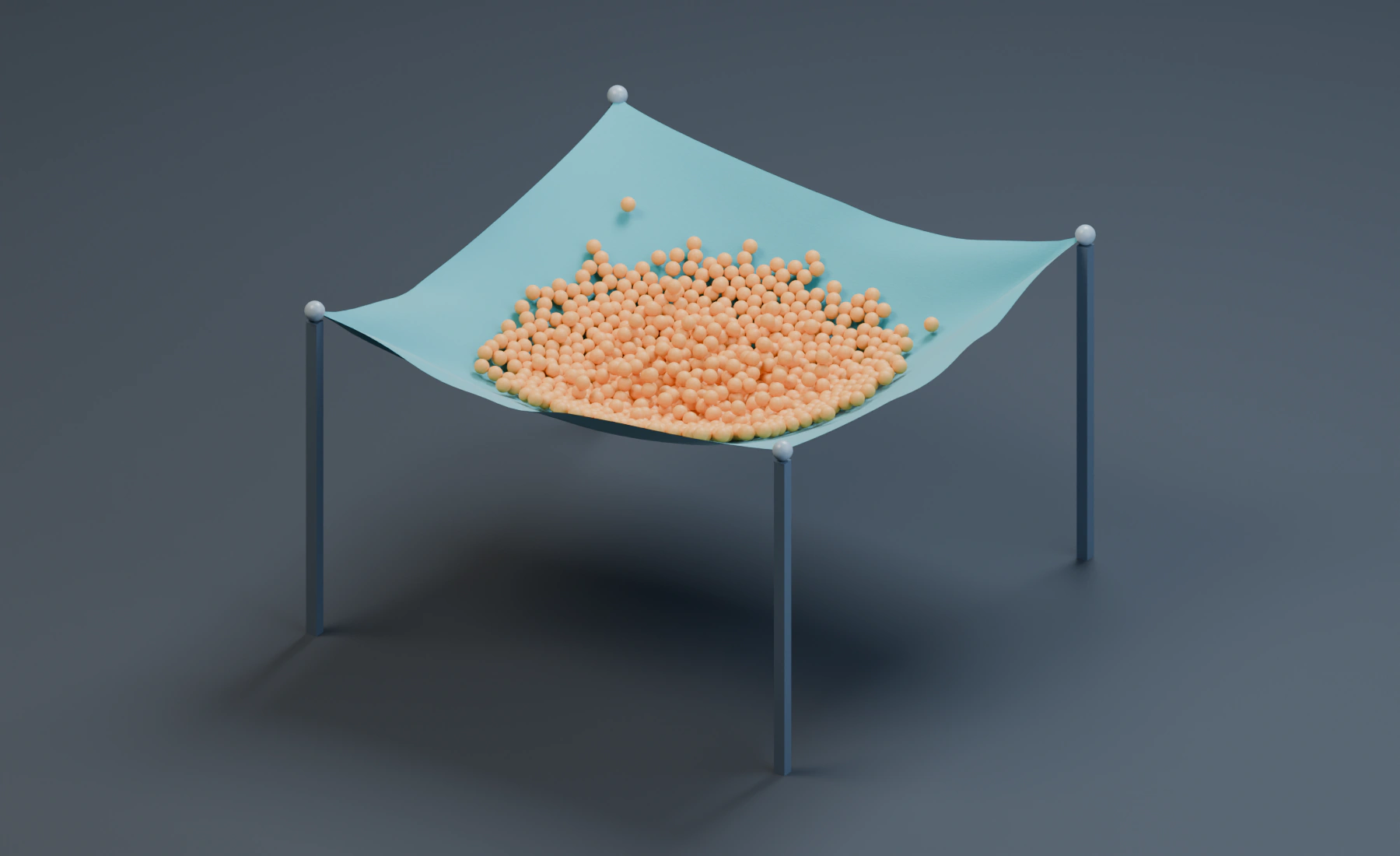
Catch a granular load in a Cloth sheet pinned at its four corners. Particle Interaction transfers the contact response between the grains and the fabric.
Build the sources
Start a new Blender file and choose Start with Lists. Use 24 fps, frames 1–64 and scene Substeps 2. The Cloth tutorial explains source topology and pin maps if these are unfamiliar.
Make the suspended sheet
The sheet is a 4 × 4 m grid with 42 × 42 vertices. Its perimeter is at Z 2.6 m, and its center is 0.65 m lower. This hollow catches the grains during their first contact.
For the illustrated source, open Blender's Scripting workspace, create a new text in the Text Editor, paste this geometry-only script and choose Run Script. It adds one mesh and its pin group; it does not configure the simulation. Run it once in the new file.
import bpy

bpy.ops.mesh.primitive_grid_add(
    x_subdivisions=41, y_subdivisions=41,
    size=4, location=(0, 0, 2.6),
)
sheet = bpy.context.object
sheet.name = "Cloth Source"
for vertex in sheet.data.vertices:
    x, y = vertex.co.x, vertex.co.y
    vertex.co.z = -0.65 * (1 - (x / 2)**2) * (1 - (y / 2)**2)
corners = [v.index for v in sheet.data.vertices
           if abs(v.co.x) > 1.99 and abs(v.co.y) > 1.99]
sheet.vertex_groups.new(name="Corner Pins").add(corners, 1, "REPLACE")
You can also model the source: subdivide a 4 × 4 m plane with 40 cuts, then use proportional editing to lower its center while leaving the perimeter level. Assign only its four corner vertices to Corner Pins, Weight 1. A different initial hollow will change the landing and settling motion.
Assign the emitters and ground
- Remove the default cube. Set the starter Emitter's Type to Cloth, and assign Cloth Source as a Surface source under Mesh Sources. Set Simulation Resolution: Full, Display: Geometry, Start Frame
1, and Initial Velocity(0, 0, 0). - Choose Pin Strength Map: Corner Pins, Black Strength
0, White Strength1. Leave the other material maps empty. - Add a UV sphere named
Grain Source, Radius0.58 m, Location(0, 0, 3.05), and apply Scale. Add a Particles Emitter and assign this sphere as a Volume source. - Choose Volume Fill: Grid, Particle Spacing
0.1 m, Jitter0, and Auto Particle Radius off. Set Start Frame1, Lifetime200frames, zero lifetime Variation, Initial Velocity(0, 0, 0), Surface Push0, and Random Velocity(0, 0, 0). - Add a cube named
Ground, Dimensions(16, 16, 0.3), Location(0, 0, -0.15), and apply Scale. Its upper surface is Z0. The illustrated stands are optional display geometry; the pin map holds the corners.
Grid fills the sphere once on Start Frame 1, producing about 791 grains with this source. Rate does not set the packed-fill count.
Material and contact settings
| Cloth control | Value |
|---|---|
| Density | 1 |
| Collision Thickness | 0.035 m |
| Stretch Stiffness | 0.8 |
| Shear Stiffness | 0.75 |
| Bending Stiffness | 0.08 |
| Damping | 0.5 |
| Solver Quality | 8 |
| Self Collision | On |
| Particle Interaction | On |
| Collision Friction | 0.8 |
| Plasticity / Pyro Interaction | Off |
| Particle control | Value |
|---|---|
| Radius | 0.055 m, no variation |
| Mass Mode | Radius Scaled |
| Mass / Reference Radius | 0.25 / 0.1 m |
Radius Scaled mass makes these grains lighter than particles at the Reference Radius. Keep source size, spacing and radius together when changing the load; changing spacing also changes how many particles press on the fabric.
Use Cloth Solver: Local XPBD. Keep Balloon and Tearing off. Deformable Interaction is not needed for the grains; Particle Interaction supplies that contact. Give the grains an orange birth color if you want to distinguish them from a teal fabric material assigned to Cloth Source.
Ordered effects and output
Add these effects in evaluation order, with Drag at the bottom of the visible Lists stack:
- Drag, Coefficient
0.2. - Gravity, Force
(0, 0, -9.81). - Collision, the ground, Bounciness
0, Friction0.5. - Granular, start from Dry Sand, then set Stiffness
0.78, Friction2.6383, Cohesion0.3204, Cohesion Radius1.02, Viscosity0, Solver Iterations6, and Activation Frames5. Keep Persistent Bonds off.
Enable the Cloth domain on Drag, Gravity and Collision. Granular handles contacts between grains; Particle Interaction on Cloth handles their contact with the sheet. Do not also add the simulated Cloth output as a static Collision object.
Use Display: Geometry for Cloth. Set the grains' Point Cloud to Blender Geometry, Particle Radius and Particle Color, leaving Material empty for the automatic color material. The initial hollow catches the first impact; damping reduces rebound. Cohesion helps the load stay together while it settles.
Let the load settle
Play from frame 1 through 64. The grains drop into the hollow, the free cloth responds to the load, and the four corners remain fixed. The grains settle against one another while the cloth supports them. Save the project once the setup is complete.
If grains pass through the sheet, check Particle Interaction on the Cloth Emitter before changing Granular. If the whole sheet falls, check the pin group and its weights. For a heavier load or a larger drop, increase Substeps or Solver Quality if contact becomes unreliable; both increase simulation time. Judge the first impact as well as the settled pose.
Nodes setup
Connect Surface Source → Emitter (Cloth) and Volume Source → Emitter (Particles), assigning the objects above. Merge their Particles outputs with Merge Disjoint Streams, then connect the ordered effects to the complete stream. Enable the corresponding effect domains. Connect Deformable Map, Vertex Group Corner Pins, output range 0–1, to the Cloth Emitter's Pin Strength input.
Connect Cloth Geometry and Point Cloud Result to Simulation Output / Geometry, and the complete final particle stream to Particles. The scene shown here uses Lists. Recreate the settings in Nodes if you prefer that workflow.
See Cloth, Soft Body & Strands, Granular and Soft Body on Cloth.