FLIP Fluid
Simulate bounded liquids with FLIP or APIC transfer, optional domain pre-fill, reseeding, thin-sheet repair, whitewater and procedural waves.
FLIP uses particles to carry liquid state and a voxel grid to solve pressure and transfer motion. The domain and Voxel Size define the grid; emitter particles and Pre-Fill define the liquid inside it. These resolutions are related but not interchangeable: reducing Voxel Size increases grid detail, while reducing particle spacing or radius increases particle count.
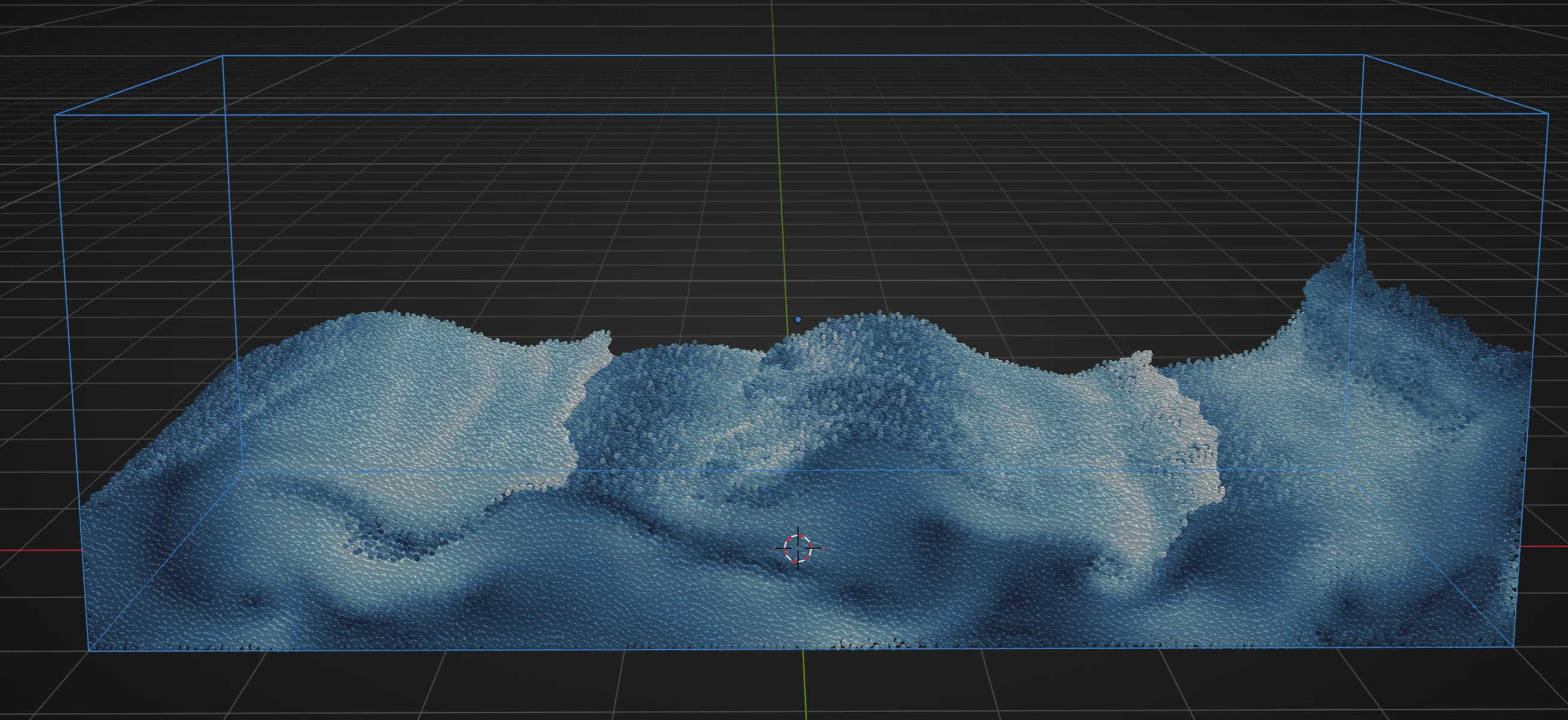
Follow Waves with Whitewater for a complete setup with separate liquid-surface and whitewater output.
Basic workflow
Lists
- Create one or more particle emitters for the liquid. Use a one-time Grid or Hexagonal Volume source for a shaped initial volume, or use ordinary rate emission for a pour.
- Add FLIP Fluid after the effects that provide the intended initial motion.
- Assign or create the
Domain Boxand choose a coarseVoxel Sizefor the first test. - Set the six Domain Boundaries and choose
FLIPorAPIC. - Test the liquid with whitewater, sheeting and waves disabled. Resolve escaping particles, collisions and scale first.
- Add a Mesher post effect when a surface is required. See Post Effects.
Nodes
Connect the complete merged particle stream to a FLIP Fluid node. FLIP is a domain solver and cannot run on only one unmerged graph branch. Use the node's Apply to and Fluid Mixer controls for populations inside that stream, and connect the result after all required simulation effects to Simulation Output or to a post effect.
The node body contains the common liquid controls. The Inspector contains the complete FLIP editor, including Pre-Fill, Fluid Mixer, sheeting and whitewater collections. Unlike PBF and SPH, FLIP Fluid Mixer entries remain in the FLIP node's Inspector rather than separate Material Override configuration nodes.
Domain and resolution
Domain Box defines the axis-aligned liquid grid. Create / Select Box creates it when absent or selects the existing object. The panel reports the evaluated domain size and resolution so the memory effect of Voxel Size is visible before simulation.
Choose a domain that contains the liquid motion but excludes unused space. Smaller Voxel Size resolves thinner streams and sharper pressure detail, but a fixed three-dimensional box can gain roughly eight times as many cells when voxel size is halved. Tune particle density independently and keep both coarse until the motion is approved.
Each domain face has its own boundary:
Closedis a solid no-flow wall. Liquid remains inside and pressure enforces zero normal flow.Openlets a liquid carrier leave the FLIP domain and continue as an ordinary particle outside it.Killuses an open pressure boundary but deletes liquid carriers after they cross it.
Use Open when escaped droplets remain useful downstream. Use Kill when the domain should discard outflow and prevent an ever-growing exterior particle population.
Pre-Fill Domain
Use Pre-Fill to start with still liquid in a tank, pool or partly filled container. It fills from the bottom of the domain once at simulation start; no matching volume emitter is needed.
- Enable
Pre-Fill Domainand choose aParticle Profile. The profile supplies particle properties such as radius and color. - Set
Fill Leveland chooseHexagonal (Fluid)for a uniform fluid neighborhood orGridfor a cubic arrangement. - Choose
Radius Source: Use Emitteruses the selected profile's radius.Use Voxel Sizeplaces particles at about half-cell spacing and sizes them to fit the FLIP grid.CustomexposesParticle Radius; smaller values make a denser and more expensive fill.- Use
Collider Cut-outsto keep initial liquid out of solid volumes. Automatic uses applicable active Collision effects; Manual uses only the listed collision volumes. Small mesh openings and minor defects are repaired automatically in the cut-out copy. Surface obstacles without usable volume do not create cut-outs. - Set a constant
Coloror use the Pre-FillAdvanced Colorstack for birth color.
Pre-Fill happens once and is independent from ordinary emitter Rate. If liquid also enters later, configure that flow with particle emitters.
Liquid model
FLIP and APIC
Solver selects the grid-particle transfer:
FLIPpreserves energetic residual motion.FLIP Ratioblends between dissipative PIC behavior at 0 and the full supported FLIP update at 1. Lower it when the liquid is too noisy; raise it when motion loses energy too quickly.APICcarries local affine motion to preserve rotation and shear with less numerical damping, especially at coarser resolution. FLIP Ratio is not the APIC control.
Retiming changes the local simulation speed of the liquid and its generated whitewater. 100% follows scene time. It is multiplied by Global Time Scale, so check both controls when timing differs from the expected result.
Material behavior
Viscosity diffuses velocity differences through an implicit solve. Raise it for thicker liquids and lower it for freely moving water. Surface Tension pulls the free surface together and promotes beads or droplets. Droplet Separation decides how freely small surface regions may detach: low values retain support and connectivity, while high values allow freer droplets and spray.
Surface Tension also contracts thin films and nearby sparse liquid that are too thin to form a surface at the current Voxel Size. This local response does not require Sheeting and remains active with either FLIP or APIC. Isolated particles outside the local liquid neighborhood receive no attraction. Lower Voxel Size to resolve smaller surface details; increasing Surface Tension does not replace spatial resolution. High values require sufficient Max Substeps for accurate motion.
Vorticity restores rotational detail lost through grid transfer. Treat it as a detail control after pressure, viscosity and resolution are stable, not as a substitute for sufficient domain resolution.
Fluid Mixer
Fluid Mixer overrides global Viscosity and Surface Tension for a selected Emitter or named Group. Each entry can override either property independently. This lets one FLIP domain contain populations such as water and a thicker liquid without creating another domain.
The override is selected from the particle's source identity or group. It does not create a boundary between materials. Keep the global value as the fallback for particles without a matching enabled entry.
Solver quality and stability
Start with Quality = Draft or Balanced while blocking the shot. Quality controls the pressure preset when Advanced Solver > Pressure > Use Quality Preset is enabled. High and Final demand tighter convergence and allow a larger pressure iteration budget.
Disable Use Quality Preset only when direct control is needed:
Accuracysets the pressure convergence requirement. Higher percentages demand a smaller residual.Max Iterationsis a ceiling; the GPU may finish early when it reaches the requested accuracy.
Viscosity has a separate iterative solve. Automatic derives its budget from viscosity, timestep and voxel size. When disabled, its own Accuracy and Max Iterations control that solve, not pressure. These controls apply only when Viscosity is greater than zero.
With Adaptive Substeps, FLIP can request more shared simulation steps for velocity and surface-tension stability. CFL limits liquid travel in voxels per step. Lower CFL is more conservative. Minimum Substeps and Maximum Substeps bound the adaptive request, while Global Substeps remains a scene-wide minimum and can require more.
Increase substeps when fast liquid crosses too many cells, thin motion tunnels through collisions, or strong surface tension becomes unstable. Increase pressure quality when volume compression or divergence remains after timing is stable. These controls solve different problems.
Weak Particle Repulsion adds a short-range spacing bias on top of mandatory liquid redistribution. Strength can loosen dense marker clumps, but high values may make small-scale motion feel artificially expanded.
Reseeding
Reseeding maintains an even number of liquid samples in supported liquid regions. It adds samples below Minimum and reduces crowded regions above Maximum. The process preserves isolated droplets and compensates represented liquid volume so the liquid does not simply grow or shrink when markers are added or removed.
Enable it when long simulations develop under-sampled sheets or crowded regions. Do not use it to increase the initial resolution of a liquid; configure source spacing or Pre-Fill density for that.
Sheeting
Sheeting detects thin, locally planar and under-supported liquid, then inserts volume-conservative markers before particle gaps become holes. It is intended for stretched films, not general particle upres.
Detection
Min Density rejects regions too sparse to represent a continuous sheet. Max Density leaves already supported liquid unchanged. Search Radius, measured in particle radii, supplies the neighborhood used for orientation, thickness and support. A larger radius stabilizes detection but can merge nearby features and costs more.
Spawn After Age prevents newly emitted liquid from immediately creating sheet markers. Limit Maximum Age, Max Age and Age Variation can restrict insertion to an age window without producing one coherent cutoff band.
Gap selection
Min Hole Size ignores gaps that are already adequately sampled. Max Hole Size prevents separated liquid from being bridged as a film. Both use the liquid's numerical particle radius before sheeting subdivision.
Separating Only requires the candidate pair to be moving apart. Max Speed rejects overly ballistic source particles; zero disables that limit. Relative Speed adds a Min/Max window along the pair direction. Velocity Alignment restricts accepted gaps to a cone around local flow, and Alignment Angle widens or narrows that cone.
Marker insertion and appearance
Insert Spacing controls marker density along an accepted gap. Both it and Min Spacing use the liquid's numerical particle radius before sheeting subdivision as a stable reference. Inserting more markers does not reduce this reference, and changing the generated particles' visible Particle Radius does not change it. A gap must accommodate the requested spacing on both sides before a marker is inserted.
Min Spacing prevents near-duplicate insertion around existing and simultaneously generated markers, including across voxel boundaries. Reservations are conservative, so some gaps may receive fewer markers per step, especially with a coarse Voxel Size. Jitter adds a deterministic tangential offset without pushing markers through sheet thickness.
Generated markers retain liquid control volume and simulation lifetime from the source liquid. Their optional Particle Profile, Group, visible Particle Radius, Velocity Scale and Custom Color control the visible particles. A Particle Radius of zero inherits the source or profile radius and never changes numerical FLIP control volume. Max Sheet Particles caps concurrently generated markers; zero leaves them limited only by global solver capacity.
Advanced sheeting
Thinness controls how planar a neighborhood must be. Lower values require a flatter film. Adaptive Collapse merges generated markers back into supported liquid when a region thickens or stops behaving like a sheet. Collapse Delay prevents immediate insert-remove oscillation.
Remove Sparse cleans generated markers that become isolated after a film breaks. Sparse Min Distance defines the isolation neighborhood and Sparse Max Density limits cleanup to weakly supported regions. Cleanup transfers represented liquid state locally; it does not delete the original source particles.
Whitewater
Whitewater creates secondary spray, foam and bubbles from liquid speed, entrained air, surface curvature and vorticity. Stabilize the base liquid first, then enable one type at a time so its birth and behavior remain diagnosable.
Generation multiplies creation after all per-type responses are evaluated. Activity Threshold suppresses weakly disturbed regions. Activity Decay controls how quickly earlier activity is forgotten, while Calm-Water Persistence controls how gradually existing whitewater fades after the liquid calms. The chosen Particle Profile lifetime remains the hard cap.
At birth, Spawn Velocity determines inherited liquid motion, Spawn Scatter offsets creation sites, and Deep Spawn Speed blocks deep generation below its speed threshold. A zero scatter derives a small amount from voxel size and particle radius. Lifetime from Energy makes the most energetic events more transient. Max Whitewater Particles caps all living spray, foam and bubbles from this FLIP effect without removing liquid carriers.
Creation signals
Spray, Foam and Bubbles each have an enable toggle, Particle Profile and Amount. For each type:
Energy MinandEnergy Maxmap liquid speed into a creation response.Entrained Air MinandEntrained Air Maxmap impact and churning.Wave Curvature Strengthweights sharp surface curvature; its optional Min/Max values define the response range.Vorticity Strengthweights rotating motion; its optional Min/Max values define that response range.Spawn After Agedelays creation from new liquid carriers.Max Spawn Depthlimits how far below the reconstructed surface creation is allowed. For Bubbles, zero permits generation throughout the interior; for Spray and Foam, zero disables the depth limit.
Set an unwanted signal's Strength to zero instead of trying to exclude it with extreme Min/Max values. Tune the ranges while Generation remains moderate, then use Amount to balance the three types.
Spray behavior
Spray is ballistic liquid detail above the surface. Air Drag removes airborne speed exponentially. Surface Alignment turns its orientation toward a reliable nearby free-surface normal without constraining it to the surface.
Foam behavior
Foam remains projected toward and transported along the free surface. Surface Advection controls how closely it follows liquid motion and Surface Alignment aligns its orientation. Foam Cohesion attracts nearby foam tangentially into streaks or islands, while Foam Spreading redistributes clumps.
Density Persistence lets well-supported foam resist calm-water fading without exceeding profile lifetime. Erosion Neighbors identifies isolated foam; zero disables the support test. Erosion Rate shortens remaining lifetime for unsupported foam and zero disables erosion.
Bubble behavior
Buoyancy sets bubble rise speed opposite the effective gravity vector, not specifically world Z. Fluid Drag makes bubbles follow local liquid while retaining buoyant motion. Bubble Spreading separates nearby bubbles, and Surface Alignment turns them toward the surface normal as they approach the interface.
Type evolution and boundaries
Type Evolution controls what happens when a secondary particle moves into another physical region:
Autoconverts between Bubble, Foam and Spray.Transition Delayprevents rapid state changes,Blend Durationblends color, radius and mass to the new profile, andTransition Hysteresisreduces chatter near the interface.Keep Typeretains the birth classification for the complete lifetime.Dissolve on Mismatchfades the particle instead of converting it afterTransition Delay.
Motion Variation adds deterministic variation to drag and buoyancy response. Contain to Fluid Domain applies the whitewater boundary rules even where liquid boundaries are Open. Spray Boundary, Foam Boundary and Bubble Boundary can Inherit Liquid, Kill, Collide or Pass Through. Boundary Bounce applies to Collide.
Waves
Waves add a traveling motion near the liquid surface. Amplitude controls strength, Frequency controls spacing, Speed controls travel, and Direction is the propagation vector. Randomize breaks uniform spacing and strength. The Waves Surface Band controls how deeply this added motion reaches into the liquid and is separate from the Advanced Liquid surface band.
Advanced Liquid
The Advanced Liquid Surface Band controls the narrow region used for cohesion and velocity smoothing around the reconstructed surface. It is not a display thickness and does not change the Mesher's voxel size or isosurface level.
Data Mapping
FLIP exposes Thickness, Surface Tension, Splashiness and Whitewater Generation to Data Mapping. The mapping labels Thickness and Splashiness drive the liquid's Viscosity and FLIP Ratio respectively. Splashiness is hidden while Solver is APIC because APIC does not use FLIP Ratio.
In Lists, add mappings in the FLIP effect's Data Mapping section. In Nodes, use Add Mapping... on the FLIP node to create and connect a Float Field for the chosen target; subsequent mappings for the same target extend that field's Previous chain. Mapping changes a parameter over particle or scene data; it does not replace the domain, boundary or source setup. See Data Mapping.
Troubleshooting
- Liquid compresses or changes volume: confirm domain scale and collisions, then raise pressure Quality or direct pressure Accuracy/Max Iterations. More source particles do not fix an under-converged pressure solve.
- Motion is noisy: lower FLIP Ratio, test APIC, reduce Vorticity, or raise resolution only after checking substeps.
- Fast liquid crosses walls: reduce CFL or raise Maximum Substeps, then verify the Collision effect and domain boundary.
- Pre-Fill starts inside objects: use Automatic Collider Cut-outs or add the required closed Collision effects manually.
- Sheeting fills real tears: lower Max Hole Size, keep Separating Only enabled, or narrow the velocity-alignment cone.
- Sheet markers multiply: raise Insert Spacing or Min Spacing, enable Adaptive Collapse, and set Max Sheet Particles.
- Whitewater appears everywhere: raise Activity Threshold and the per-type response minima before lowering the master Generation.
- Whitewater vanishes at the domain edge: inspect Contain to Fluid Domain and the per-type boundary mode, independently from the six liquid boundaries.
- Surface lacks detail: distinguish simulation resolution from presentation. Lower FLIP Voxel Size for physical detail, or lower Mesher Voxel Size for a finer output surface.