Post Effect and Output Nodes
Post Effect nodes turn the final particle stream into visible geometry or additional detail particles. Output nodes save or export the result. Connect their outputs to Simulation Output.
Where to find it
Use Shift+A > Post Effects for presentation nodes and Shift+A > Output for Simulation Output, Output Cache and Alembic.
Post Effect connections
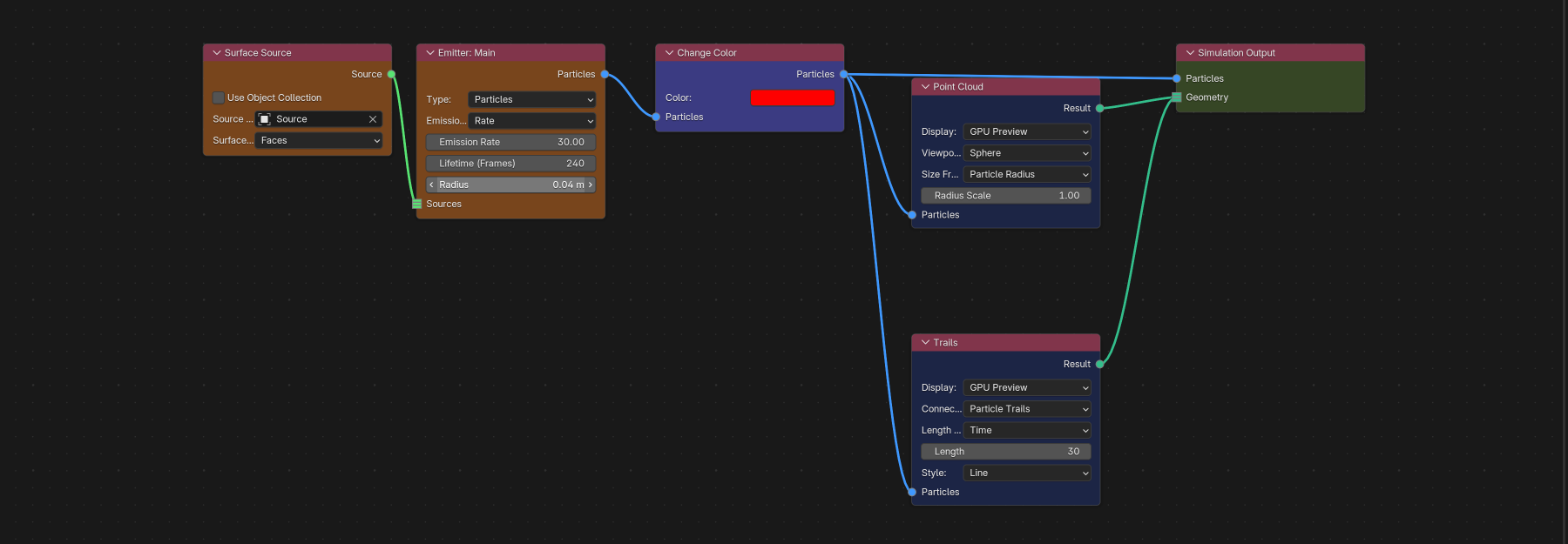
Every post-effect node accepts Particles. Post effects must receive the complete merged final stream and must sit downstream of every enabled simulation effect. Use the post effect's own emitter/group filters to select a visible subset; a partial Emitter Branch is invalid at this stage.
See Post Effects for all presentation controls. In the Shader Editor and Geometry Nodes, Particle Info reads the attributes selected on the resulting Blender Geometry or Output Cache.
Post Effect nodes
Every post-effect node names its output socket Result. The table lists the value type carried by that socket.
| Node | Output | Node-specific behavior |
|---|---|---|
| Point Cloud | Geometry | direct final point geometry / GPU preview |
| Trails | Geometry | trajectory, connection or constraint-link geometry |
| Instance | Geometry | instances selected from one object or collection |
| Mesher | Geometry | reconstructed particle surface |
| Upres | Particles | adds non-physical detail particles that can feed another post effect |
| Dendrite | Geometry | geometry of the grown Dendrite branches |
Upres is the only post effect that outputs a Particle Stream. In Nodes, connect Upres → Point Cloud / Instance / Trails / Mesher to display or export its detail particles. These particles do not affect the upstream physical simulation.
Multiple post nodes may branch from the same final particle stream. Each displays the same completed simulation using its own settings.
Output Cache
Inputs: Particles, Geometry
Output: Output (Simulation)
Output Cache requires one supported final Geometry source. Connect Point Cloud, Trails, Instance, Mesher, Dendrite, deformable Geometry or Dynamic Collider Geometry. A raw particle stream is rejected because Output Cache stores the final geometry.
Each Output Cache node represents one graph cache definition. Use multiple nodes when several separate Geometry streams need separate cache definitions. Connect each Output to Simulation Output / Outputs.
See Caching and Output for paths, versions, frame ranges, playback, baking and clearing behavior.
Alembic
Inputs: Particles, Geometry
Output: Output
Accepts exactly one supported final Particle or Geometry source. A Particle input must be the complete merged final stream. Geometry can come from a supported post effect, deformable Emitter or Dynamic Collider. Select export range, coordinate convention and attribute profile in the Inspector, then run Export Alembic there.
For a Dynamic Collider, connect Geometry to the output node and keep Particles connected through the complete simulation stream. Both output types capture its final motion for each frame, including particle and Pro Pyro interaction.
See Caching and Output.
Simulation Output
The scene graph requires exactly one Simulation Output in the main graph. Connect every branch needed for the simulation or its outputs here.
Particles: final complete particle stream, required for a particle graph even when Geometry is connected.Geometry: multi-input final geometry from post effects or deformables. Post effects such as Point Cloud and Trails provide visible particle output; the Particles input alone creates no display geometry.Pyro: multi-input socket for the final Pyro Dynamics state; only one active Pyro branch is allowed.Outputs: multi-input Simulation actions such as Physics Event actions, Output Cache and Alembic nodes.
Keep Simulation Output in the main graph, outside any Physics Group. A second Simulation Output shows an error. Branches that do not reach it are marked as disconnected and do not run.
Final-state rule
Place output nodes and post effects after all enabled simulation effects. They use the finished simulation result. Pro Physics cannot save an intermediate result halfway through an effect chain.
To display or export only some particles, keep the complete simulation connected and select emitters or groups in the post effect or output filters.
Troubleshooting
- A post effect rejects an Emitter Branch: merge every particle partition first.
- Output Cache rejects Particles: add a geometry-producing post effect or connect Cloth/Soft Body/Strands Geometry.
- Alembic reports incomplete particles: merge the stream and place the export after all effects.
- Simulation Output reports a missing effect branch: at least one enabled effect branch does not reach the final particle stream. Rejoin it with Merge or Order.
- An Output node is connected but never runs: connect its
Outputsocket toSimulation Output / Outputs.