Granular
Granular is the dedicated particle contact solver for sand, gravel, powder, soil, clay, mud clumps, snow, and crumbling earth.
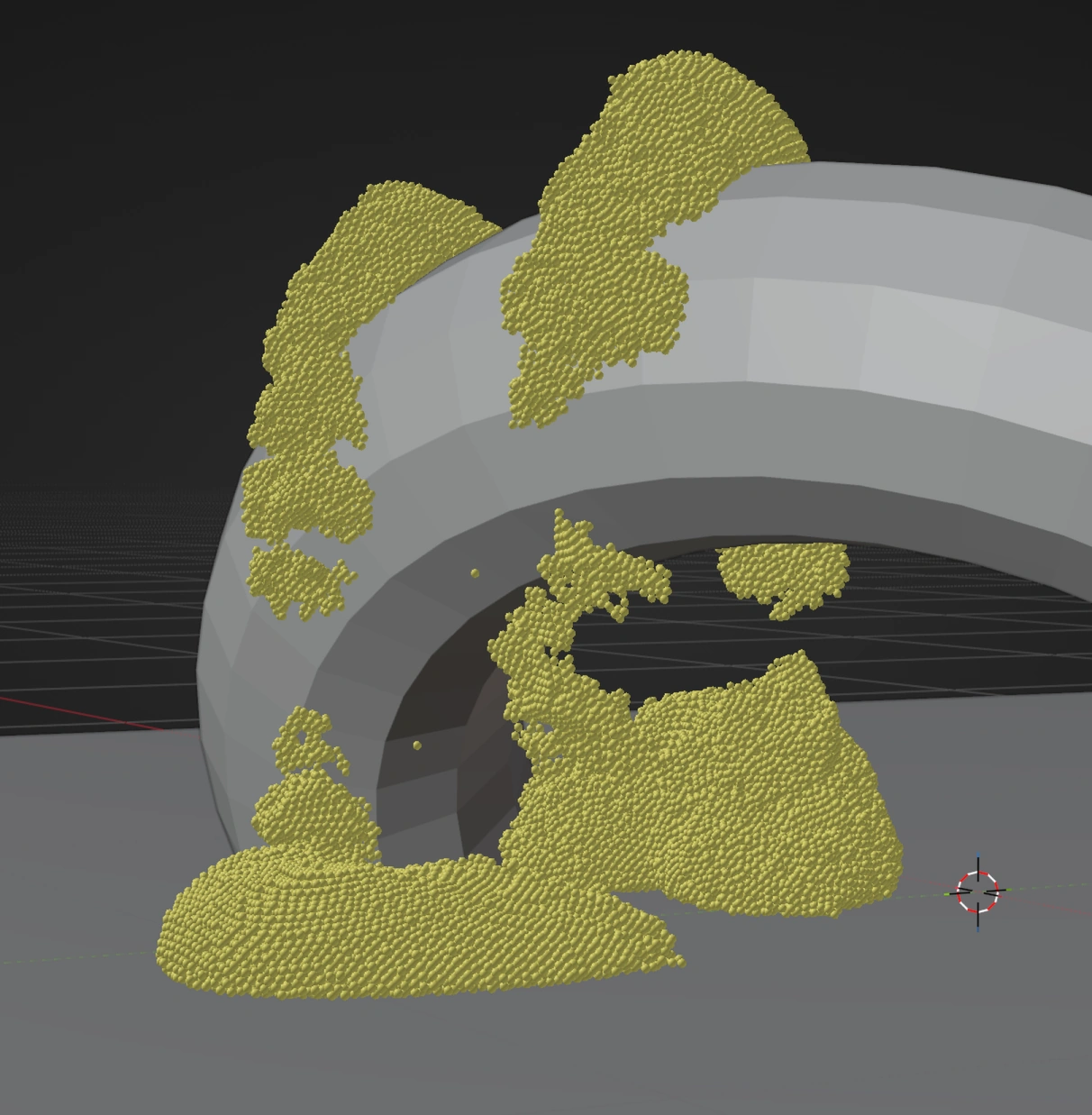
Granular resolves interaction between affected particles. Add Gravity or another force for external motion and Collision for scene geometry. Do not apply Granular, PBF Fluid, and SPH Fluid to the same population. Use separate Groups or Emitters when a scene contains more than one material solver.
Basic workflow
- Set emitter Radius and spacing for the physical grain scale.
- Add the forces and Collision effects required by the scene.
- Add Granular and filter it to the material's Group or Emitter if other particle populations exist.
- Choose the closest Material preset.
- Simulate from the start and evaluate both active motion and the settled material.
- Tune Friction and Cohesion for the broad material character.
- Tune Stiffness and Viscosity.
- Increase global Substeps or Granular Solver Iterations only when the basic scale and spacing are correct.
For larger pieces that must hold together and fracture, enable Bonded Clumps after setting the grain scale. Keep Cohesion for loose attraction between grains.
Material presets
Dry Sand, Wet Sand, Gravel, Powder, Snow, Soil, Clay, Mud Clumps, and Crumbling Earth set the controls below to material-specific starting values. The controls remain editable afterward. Selecting Custom keeps the currently authored values instead of replacing them.
Presets do not change Bonded Clumps, particle Radius, emitter density, gravity, colliders, or post-effect appearance. Those remain independent of the material preset.
Material controls
- Stiffness controls resistance to compression and overlap. Low values produce softer packing; high values require enough iterations and substeps to resolve dense contact.
- Friction resists sliding between particles and strongly affects the angle a settled pile can hold.
- Cohesion attracts nearby particles, producing damp sand, snow, clay, or clumped material.
- Cohesion Radius multiplies particle radius to determine the cohesive range. It is active only when Cohesion is above zero. Larger ranges include more neighbors and cost more.
- Viscosity damps relative particle motion. It produces a thicker, gel-like response and is different from Cohesion, which supplies attraction.
Adjust one behavior at a time. A high-friction non-cohesive material can hold a steep pile but still break into individual grains. A cohesive material can remain clumped even with lower friction. Viscosity determines how quickly motion inside those clumps is damped.
Bonded Clumps
Bonded Clumps creates persistent bonds between nearby grains when the grains first enter the simulation. Bonds preserve the distance at which they were created until they break. If grains already overlap at creation, their bond distance is at least the sum of their radii. Grains from different emitters do not bond to one another. Existing grains do not form new bonds later, and broken bonds do not reconnect. Enable this for chunks that should initially move together and then crumble. Leave it off for loose sand or gravel.
Activation Frames ramps granular contact response; it does not delay bond creation or bond stiffness. Set the initial spacing before increasing Bond Stiffness.
- Bond Radius is the maximum initial separation as a multiple of the sum of two grain radii. The default of 1.5 also connects diagonal neighbors in regular packing, which reduces shear in chunks. Lower it if separate parts are being joined; larger values can bridge gaps and cost more during bond creation.
- Max Bonds limits how many links one grain stores. The nearest eligible grains take priority. Other grains may also link to it, so this is not a strict total neighbor count. Granular bonds and persistent Particle Constraints share a pool of 16 stored links per particle, so using both on the same grains can exhaust that pool.
- Bond Stiffness resists changes in the initial distance. Bond Damping reduces relative motion along the bond.
- Setting Bond Stiffness to 0 skips bond creation and bond solving.
- Break Stretch is the relative extension beyond the initial distance that breaks a bond. A value of 0 makes bonds unbreakable.
- Bond Iterations controls the shared bond solve. The highest active bond or Particle Constraints iteration value is used, at additional GPU cost.
Bonded Clumps does not make every simulation a rigid solid. Sparse initial spacing, low Max Bonds, or weak Bond Stiffness can leave chunks flexible. Dense bonds can keep pieces together longer after an impact. Tune the initial particle spacing and Bond Radius first, then Break Stretch and Bond Stiffness. More bonds also increase memory use and simulation time. When bonds are active, the solver performs another contact cleanup after moving bonded grains; higher Granular Solver Iterations increase this cost.
Solver controls
- Solver Iterations repeats the granular contact solve per simulation substep. More iterations improve stiffness and dense packing at higher GPU cost.
- Activation Frames ramps the material response from zero to full strength after particles spawn. This reduces violent correction when new particles begin close together.
Global Substeps improve all time-dependent motion and collision integration. Granular Solver Iterations refine this material solve inside each substep. If fast particles miss geometry, increase Substeps. If a slow dense pile remains too compressible after scale and stiffness are correct, increase Solver Iterations.
More Solver Iterations reduce residual grain overlap but cannot guarantee zero overlap in every scene. Initial emitter overlap, Activation Frames, fast impacts, and insufficient Substeps can still produce temporary intersections. Correct the initial particle spacing before increasing iteration counts.
Granular contact stabilization stores additional per-particle state, about 16 MB per million particle slots. Account for this in scenes with high particle capacity.
Particle Sleep
Particle Sleep is off by default. When enabled, it holds qualifying grains in a reversible sleeping state. Sleeping grains remain in the granular contact solve and can support other grains. Sleep does not use the Freeze state, and it does not remove the contact solve.
- Sleep Trigger: Resting requires supported, slow motion for Rest Time. Sleep Speed is the highest qualifying speed. Free-falling grains do not qualify.
- Mask Only sleeps particles selected by Sleep Mask, including particles without contact support. Use it when the mask should control the state directly.
- Resting + Mask requires both supported, slow motion and the Sleep Mask. The Sleep Mask can vary with Time, Age, Noise, position, or other supported particle masks.
- Wake Speed sets the motion that wakes a sleeping grain. Wake Mask can wake it independently; wake takes priority when both masks are active. In mask-driven modes, losing the Sleep Mask also wakes the grain.
- Sleep Mask Threshold and Wake Mask Threshold compare against the combined influence of their respective mask chains.
In Lists, use Add Mask... in the Sleep Mask or Wake Mask stack, then set each mask's Blend Mode and Influence. The Sleep Mask stack is required for Mask Only and Resting + Mask; the Wake Mask stack is optional. In Nodes, connect a Mask or Mask Blend chain to the Granular node's Sleep Mask and optional Wake Mask inputs. The standard effect Mask remains a separate control. Lists and Nodes store their own setups.
Particle Sleep is intended for art direction of settled regions and timed activation. Choose a Wake Speed above minor contact jitter and below the motion that should reactivate the grains. In Resting mode, unopposed motion prevents sleep regardless of Wake Speed. Mask Only can hold particles without contact support; Resting + Mask still requires its Resting conditions.
The initial values are Sleep Speed 0.05, Wake Speed 1.0, Rest Time 0.25 seconds, and 0.5 for each mask threshold. Speeds use scene units per second.
Lists and Nodes
In Lists, add Granular to the Effects stack and use Apply to to select the intended population. Mappable material controls can use Data Mapping. Bond controls are set on the Granular effect.
In Nodes, connect Granular in the particle stream. Set Bonded Clumps in the Granular node inspector. Use Fields for compatible material inputs and Apply to: Group to select the granular population. Granular requires the complete particle stream. Rejoin any earlier emitter branches before Granular, shared domain solvers, and post effects.
Both workflows run the same solver and reject overlapping PBF/SPH/Granular targets.
Choosing another solver
- Use Self Collision when only direct particle collision and friction are required.
- Use Push Apart for inexpensive visual separation without a granular material response.
- Use Particle Constraints for connections beyond Granular's birth-time bonds, or for dynamic distance, friction, viscosity and cohesion constraints.
- Use MPM for continuum-style sand, clay, snow, foam, plasticity, or fracture inside a voxel domain.
- Use PBF, SPH, or FLIP for liquid behavior.
Troubleshooting
- Explosive startup: Reduce emitter overlap, lower emission density, or increase Activation Frames.
- Excessive compression: Confirm Radius and spacing, then increase Stiffness, Substeps, or Solver Iterations.
- Pile too flat: Increase Friction.
- Unexpected clumps: Reduce Cohesion and Cohesion Radius, or turn off Bonded Clumps. Check that a cohesive preset did not leave a nonzero Cohesion value.
- Material looks rigid: Reduce Cohesion, Cohesion Radius, or Viscosity.
- Poor performance: Reduce particle count, unnecessary Cohesion Radius or Bond Radius, Max Bonds, and solver iterations before removing visible detail elsewhere.
- Solver conflict warning: Granular overlaps PBF or SPH on the same particles. Correct the Apply to group/emitter filters.
For a complete setup tutorial, see Sand and Snow with Granular.