Dendrite
Hierarchical branch and crystal-growth simulation with persistent branch history and dedicated output geometry.
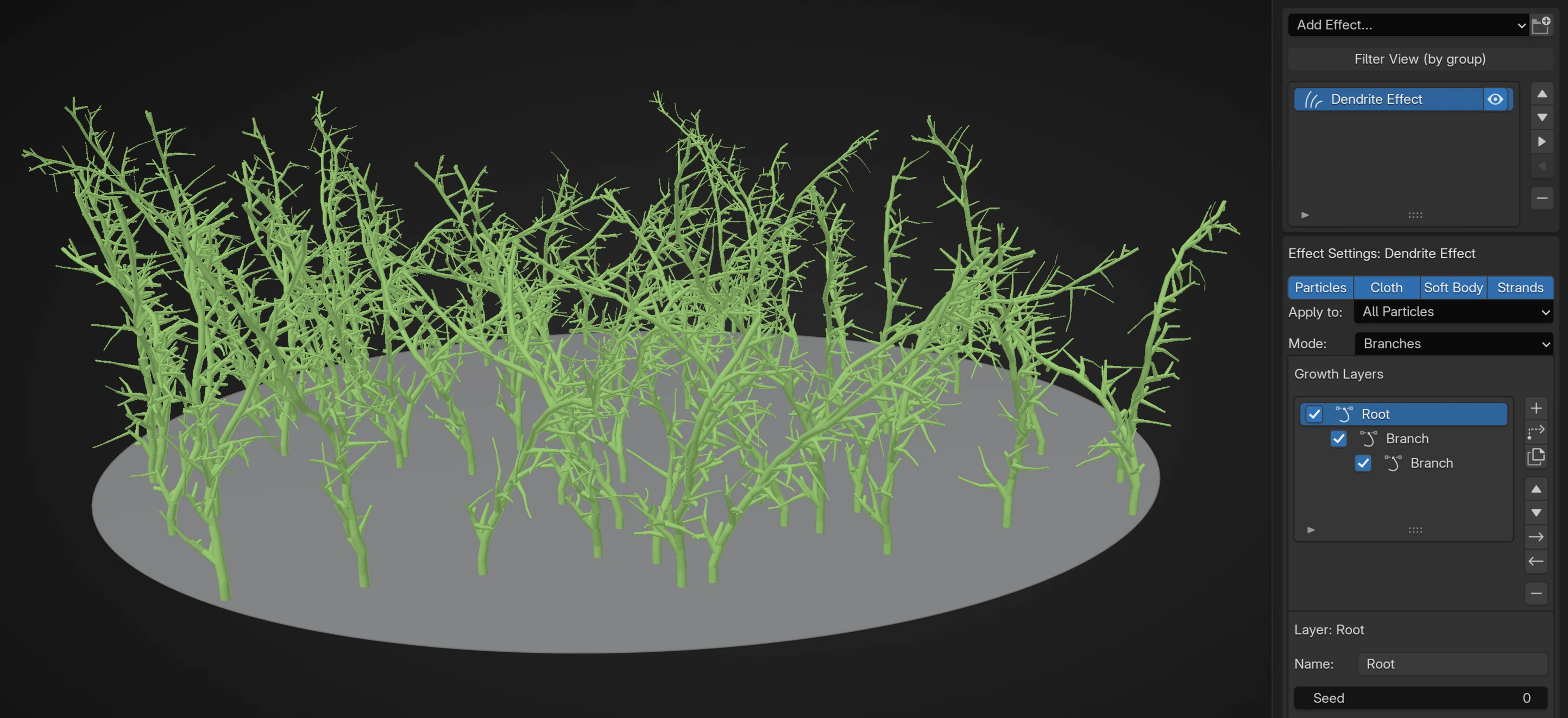
The Dendrite simulation effect records persistent branch history from affected particles. A separate Dendrite post effect turns that history into GPU Preview or Blender Geometry. Tune growth on the simulation effect and appearance on the post effect.
Follow Dendrite Crystal Growth for a single-seed setup, growth checkpoints, and renderable branch history.
Choose a mode
| Mode | Use it for |
|---|---|
| Branches | Art-directed stems with timed or distance-based bends and parent/child branching |
| Network | Angular paths with controlled heading, pitch, plane, and turn probability |
| Bethe Lattice | Deterministic recursive structures with a fixed branching factor |
| Dendrite | Crystal-like recursive growth with wander and directional bias |
Mode changes the meaning and available controls of every growth layer. Establish the mode before building a large hierarchy.
Basic workflow
Lists
- Add Dendrite after the Emitters that provide the initial growth particles.
- Choose the Mode and set Apply to to the intended seeds.
- Add one Root layer and configure its length, direction changes, and appearance.
- Run a short simulation and confirm the root path before adding children.
- Add a Child layer, then tune the parent's Branch Spacing and the child's own length and speed.
- Add Growth Interactions or a Volume Boundary only after the hierarchy grows correctly without them.
- Set Branch History sampling and Limits for the required visual detail and budget.
- Add a Dendrite post effect, select this simulation effect as Source, and choose GPU Preview or Blender Geometry.
Nodes
Nodes represents the branch hierarchy directly:
- Place the Dendrite effect after the complete particle stream. Merge disjoint emitter branches before this shared simulation effect.
- Choose Mode, then add a matching root branch component and connect it to Root Branches.
- Chain multiple roots or children through Previous Sibling.
- Connect a child branch chain to its parent's Child Branches input.
- Connect fields to a branch component's mappable parameter sockets when branch behavior should vary from particle data.
Previous Sibling sets the order at one hierarchy level. Child Branches connects a child to its parent. A branch component can have only one parent and one position in the hierarchy; duplicate it to use the same settings elsewhere. Node hierarchies are limited to 64 levels. In Lists, build the hierarchy with Add Child, Indent and Outdent.
Growth Layers
Build a hierarchy with Add Root, Add Child, Duplicate, Move Up/Down, Indent, Outdent, Remove, and per-layer enable. The selected layer exposes Name and Seed.
A child layer defines the branches generated from its direct parent. Sibling order does not make one sibling the child of another. In Lists, an enabled child of a disabled or unavailable parent is promoted to a root. In Nodes, children are nested inside their parent component, so disabling the parent omits that connected subtree.
Branch Appearance
Color; Radius mode = Particle Radius or Absolute; Particle Radius mode uses Radius Scale, Absolute uses Radius; Taper reduces radius toward branch ends.
Particle Radius follows the incoming seed particle radius, while Absolute uses a world-space branch radius. Color is stored in branch history and is available to GPU Preview, Blender Geometry, and export. Blender Geometry exposes it as col.
Branches > Stem Growth
Growth Speed; Length By = Time, Distance, or Parent Curve; Time uses Duration, Distance/Parent Curve use Length, and Parent Curve adds an editable parent-position-to-length curve; Variation; Bend By = Time or Distance; Bend Interval; Interval Variation; Minimum Angle; Maximum Angle; and Bend Style = Natural, Zigzag, or Curl. Curl adds Curl Angle, Curl Tightness, and Curl Strength.
Time-based length and bend intervals follow growth time; distance-based settings follow traveled world distance. Parent Curve evaluates the editable curve from the child branch's spawn position along its parent, making branch length depend on where the child was created. Curve X is the normalized position along the parent; Y multiplies branch length.
Branches > Child Generation
Branch By = Time or Distance, Branch Spacing, Spacing Variation, Branches per Event, Maximum Branches, Minimum Branch Angle, Maximum Branch Angle, Distribution = Random, Spiral, or Symmetrical; Symmetrical adds Symmetry = Paired or Alternating; Spiral/Symmetrical add Rotation Step; plus Child Length Scale, Child Speed = Inherit or Absolute, and Speed.
These controls belong to the parent and determine when its direct child layers are seeded. The child layer then supplies its own growth pattern. Maximum Branches is a per-parent-tip cap; zero removes that cap but the effect-wide limits still apply.
Network
Adds Turn By = Time or Distance, Turn Interval, Interval Variation, Heading, Heading Variation, Pitch, Pitch Variation, Plane = Any/XY/XZ/YZ, Direction = Both/Positive/Negative, Space = Local or World, Heading Chance, Pitch Chance, and Corner Smoothing, followed by the Branches stem/child controls above.
Bethe Lattice
Branching Factor, Levels, Segment Length, Branch Angle, Child Scale, and for child layers Sub-Layer Spacing.
Dendrite Crystal Growth
Crystal Angle, Angle Variation, Branch Count, Branch Spacing, Levels, Segment Length, Length Variation, Child Scale, Wander, Bias Strength, Bias Direction, and for child layers Sub-Layer Spacing.
Growth Interactions
Growth Competition, Same Layer, Other Layers, optional Curve / Curve Samples, Detection Radius, and Response = Deflect, Stop, or Kill; Deflect adds Deflection.
Competition checks growing tips against the selected branch populations and optional guide Curve. Deflect changes direction, Stop preserves the branch but stops the tip, and Kill removes the competing growth. Enable only the populations required by the design because larger detection radii and more active tips increase interaction work.
Volume Boundary
Enable Volume, choose an Object or Collection, then set Keep = Inside or Outside, Boundary = Reflect, Stop, or Kill, Detection Distance, and Boundary Offset.
Inside or Outside classification uses enclosed mesh volumes. Small openings and minor surface defects are repaired automatically; flat or unrepairable volumes produce an error. Detection Distance controls how early the boundary response begins; Boundary Offset moves the effective boundary without modifying the source mesh.
Layer Data Mapping
Each Dendrite layer has its own mapping stack. Mappable targets are Length, Bend Interval, Bend Angle, Branch Spacing, Branch Angle, Child Speed, Wander, Bias Strength, Radius, Taper, Competition Radius, and Growth Speed.
In Lists, add Data Mapping inside the selected growth layer. In Nodes, connect compatible fields to the corresponding sockets on that branch component. Mappings belong to one layer, so a parent's mapping does not automatically control its children.
Branch History
Maximum Frame Interval, Minimum Distance, and Maximum Direction Change.
History records a point when one of these sampling requirements demands it. Smaller frame intervals and distances, or tighter direction-change sampling, retain more detail and increase history and output geometry size.
Limits
Maximum Active Tips, Maximum Branches, and Maximum History Points.
These are hard workload and storage limits. If growth stops uniformly, check them before changing material or branch settings. Maximum History Points also limits the geometry detail available to the Dendrite post effect.
Output
Add the Dendrite post effect and select the simulation effect under Source. GPU Preview provides Line or Tube preview. Blender Geometry writes to the chosen Target and uses the selected Material. Output Cache and Alembic can use the resulting Dendrite stream; see Post Effects and Caching and Output.
Troubleshooting
- No branches appear: Confirm an enabled root layer, affected seed particles, non-zero growth speed, and limits above zero.
- Children never spawn: Confirm that the child is parented to the intended layer and that Branch Spacing, Maximum Branches, and the parent's length allow a branch event.
- A Nodes graph reports the wrong component type: Branch component types are mode-specific. Use branch nodes matching the Dendrite effect's current Mode.
- A Nodes branch reports multiple parents: Duplicate the branch component instead of connecting one component beneath several parents.
- Growth stops early: Check the layer length, Stop or Kill interactions, Volume Boundary, Maximum Active Tips, Maximum Branches, and Maximum History Points.
- Curves look angular: Reduce Minimum Distance, lower Maximum Frame Interval, tighten Maximum Direction Change, or use output tube smoothing as appropriate.
- The solve becomes expensive: Reduce active tips, branch counts, hierarchy depth, competition radius, curve samples, or history density before increasing global limits.